Friday, August 03, 2007

Microsoft's SharePoint Team Blog published a fascinating case study on the development of Glu Mobile Games's website a few weeks ago...The website was built on MOSS 2007 but with some significant rejigging to support some distinct needs: namely support for multiple cultures, fast load speed, streaming flash videos, and mobile devices.

The blog entries are here:

  • Part 1: Overview of the Solution
  • Part 2: Master Pages and User Controls
  • Part 3: Performance - Cache is King

Glu Mobile shows what can be done using SharePoint as a product and SharePoint as a platform. The company creating the Glu Mobile website, AllIn Consulting, used MOSS as the basis for the site's content publishing and lists functionality, and then built their own custom ASP.NET controls and features to meet the stringent functional requirements. To quote them,

Our design philosophy from the start was to integrate the best of ASP.NET 2.0 and MOSS 2007 to implement a highly functional, manageable, and scalable site within a short amount of time.

Their attention to detail was so exact that they actually created a special "whitespace filter" - an HTTP Module I guess - that stripped out the whitespace in the HTML code so that when a page was downloaded it was an average of 5k smaller! Other examples of their exacting care are their server-side code that streams JavaScript that is targeted to a user's browser for maximum browser compatibility, and a custom-built "variation" engine to simplify maintenance of localized site content.

As their company name suggests, AllIn were prepared to gamble on the core feature set of SharePoint and their ability to recognize the areas where the project required them to strip out existing functionality and roll their own code.

What they created, from the evidence of the blog case study and the website itself, is more than the sum of its parts. Congratulations to the AllIn team for providing such a lovely example of cutting-edge development on the MOSS platform. I hope the SharePoint blog features more examples like this in the future.

Sunday, July 29, 2007

Billion Dollar Bet

At its 2007 Financial Analyst Meeting on July 26, Microsoft announced that revenue for Microsoft Office SharePoint Server 2007 surpassed $800 M US in fiscal year 2007. This is a growth rate of over 35% from last year.

This success appears to be floating the Microsoft Business Division's bottom line, which increased its revenue by nearly $1.5 billion over the last quarter. The Q4 FY2007 earnings are detailed on Microsoft's site.

There's more information on CNN Money here.

I particularly like this quote taken from Todd Bishop's Blog, at the Seattle Post-Intelligencer website:

The company says the trend puts SharePoint on track to become a billion-dollar product, based on annual revenue.

Something worth noting is that these figures can't take account of Windows SharePoint Services 3.0 adoption, which is technically "free" on a licensed Windows Server 2003 installation. I've seen many organizations that are building solutions on top of WSS and won't count directly as generating SharePoint revenue.

However, each successful WSS project is a factor in purchasing and maintaining Office and Windows Server licenses and I feel these projects are just as key to Microsoft's SharePoint platform roadmap as fully fledged MOSS installations are.

Anecdotally, apart from VMWare, I can't ever recall seeing such a rapid take-up and so much enthusiasm for an enterprise product. I think the SharePoint numbers would be even higher, but one of the things slowing adoption is the need for many companies to address their internal business processes and infrastructure, something which they recognize might be lagging, and which a proper SharePoint implementation seems to act as a catalyst for.

Increasingly, standardizing on the SharePoint platform looks like a good bet.

Friday, July 27, 2007

The Beta 2 of Visual Studio 2008 (aka "Orcas") has been released. To download it, point your browser at http://msdn2.microsoft.com/en-us/vstudio/aa700831.aspx.

If you're using the VPC version you'll first have to download and install the base virtual hard disk, Base01.vhd. It's available here.

After extracting the VPC or DVD, you'll also have to download and run a script to prevent the beta from messing up any existing Ajax development you may be working on.

Finally, if you are using the VPC image you can log onto the box using the username "Administrator" and the password "P2ssw0rd". It will prompt you to change the password once you log in for the first time.

Scott Guthrie has been blogging about many of the cool features that are contained in Visual Studio 2008.

Some of the things that I hope to try over the next few days:

  • Working with Linq, especially trying to figure out how it would work in an n-tier architecture;
  • Nesting master pages;
  • Trying out the enhanced CSS support;
  • Using the embedded Ajax framework and enhanced JavaScript intellisense and debugging.

Happy coding!

Thursday, July 26, 2007

Another day, another SharePoint learning experience for me...This time one of my SharePoint colleagues at work, Viraf, was trying to connect to an Oracle database using the BDC. I'd had some previous success using database credentials authentication to a SQL Server-backed CRM application so he and I put our heads together to get this BDC Oracle connection working.

Because we didn't have Oracle installed anywhere initially, we began by mocking up one of the client's tables in a temporary SQL Server 2005 database and using the steps in my previous post to connect to it. Since those instructions weren't using Integrated Windows Authentication and used plain old SQL command text, we figured this would be a pretty good head start. The only major change to the BDC Schema App file was the line:

<Property Name="DatabaseAccessProvider" Type="System.String">SqlServer</Property>

had to change to:

<Property Name="DatabaseAccessProvider" Type="System.String">Oracle</Property>

Any table names referenced in the SQL Command text in the App schema had to be prefaced with the database schema name; ex:

SELECT Field1, Field2 FROM MySchemaName.TableName

Unfortunately although all was right with the BDC schema, there was an authentication error when trying this against the client's Oracle instance. The culprit was the Single Signon database which managed the connection.

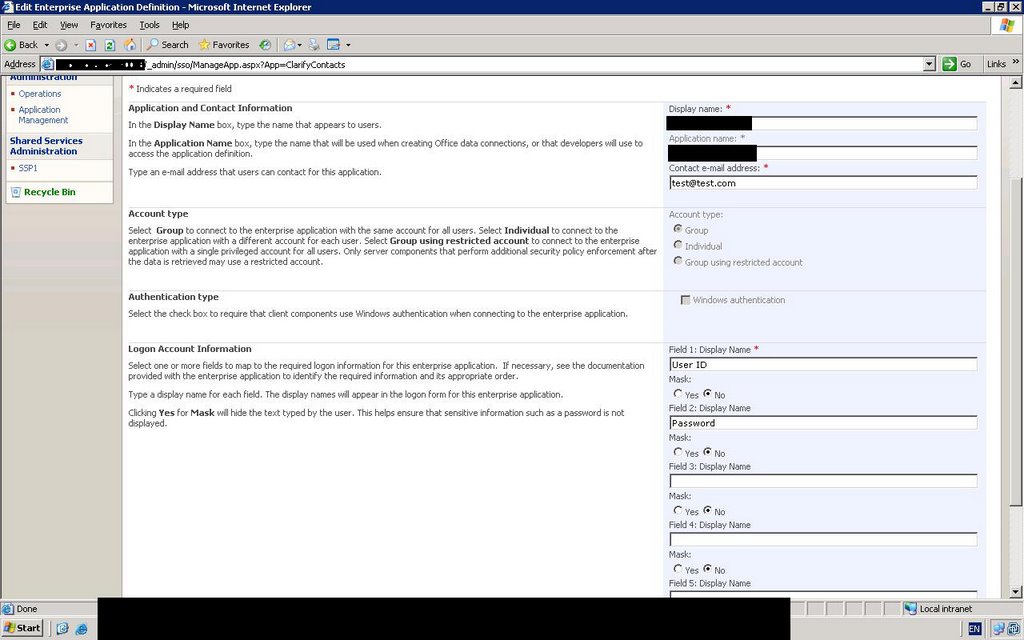
In the SQL Server test database Viraf was using, the only fields required in the Single Signon Application Schema were User Id and Password. However, Oracle requires one more field (Field 3) to complete the Connection String: "Integrated Security".

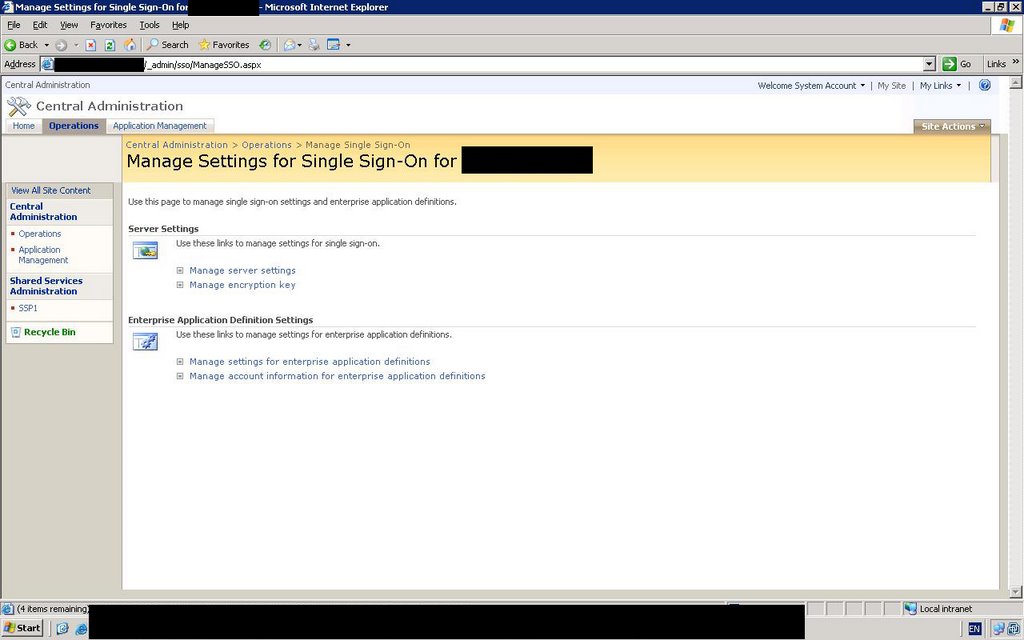
After adding this, in the “Manage Single Signon” section, we went to “Manage Account Information for enterprise application definitions” and selected the application. We needed “\Domain Users” as the group that would authenticate using SSO (in other words, every SharePoint user would use this connection). Finally, we filled out the User Id field with the Oracle username, the Password field with the account password, and the Integrated Security field with the value "no".

Although we were able to get this running internally after Viraf set up an Oracle installation to prove this would work (it did), the deployment at the client site failed with the following error in the SharePoint log files:

System.Data.OracleClient requires Oracle client software version 8.1.7 or greater.

Viraf found the following article on Roy Tore Gurskevik's blog that seems to explain it: http://dotnetjunkies.com/WebLog/rtgurskevik/archive/2005/01/19/45958.aspx . The good news is that to reach this point a connection has to be happening and SSO reports that the connection string is being retrieved. We're awaiting official confirmation but it looks like this is an environmental issue.

Sunday, July 22, 2007

The Two Solitudes

For several weeks my colleague David Marsh and I have been discussing the work we do with SharePoint, what the impact of it is, and where web development trends are heading. One topic that kept being raised was the arrival of a new shared development model.

Often our work in client projects involves acting as a sort of intermediary between the Information Technology team (whatever its precise title) and the End Users - what you might call the "Two Solitudes". I don't mean to suggest that these two broad groups are in conflict with each other - simply that they have distinct perspectives that are not always reconciled.

In most companies, the IT team has long had the primary responsibility for building and maintaining software. As a result of recent web technologies and trends, end users have been handed powerful new tools that make them de facto software developers. However, they are still in the habit of turning to IT whenever there is a problem. IT for its part has difficulty tracking what end users have done and also faces increased complexity managing the runaway adoption of collaborative software for blogs, wikis, and chat.

SharePoint 2007 is a perfect example of this challenge. It is intended to reduce the burden IT has to face, and it does this very successfully. The IT team is no longer a bottleneck when an end user with "Contribute" or "Manage lists" permissions can create lists, upload content, manage group membership, and add, modify and delete web parts at will. End users can even use SharePoint Designer to modify the look and feel of their sites. However, there are still times when they run into problems - if they delete or incorrectly modify a site for example or have problems with a DataView web part. In such a case there is no history in SharePoint Designer, and IT will have a very difficult time responding.

Also, even when all goes well, there is a management issue. The ability to assign metadata and provision sites at will is fine in the abstract, but it sidesteps the valuable practice of researching and planning the business requirements - something that IT knows how to do as part of the software development life cycle. SharePoint's ease of use makes it mighty tempting to act in haste and repent at leisure.

Nobody wants to turn back the clock - and the present trend of shifting development responsibilities towards the end user (whether in SharePoint or any other recent technology stack) is only going to become more pronounced.

So it is important to identify ways IT and end users can share the development mantle. I think there are four major "virtues" required to overcome these challenges and share the development role:

  1. Discipline
  2. Vision
  3. Communication
  4. Leadership

By "Discipline" I mean the effort required to understand how the technology works, what its potential is and what limitations it has. It also describes the effort needed to adhere to the governance guidelines, any development standards that are in place, and industry and community best practices.

"Vision" provides a road map for IT and End Users to understand where they are heading collectively. Without a shared vision development is inherently tactical and aimless.

"Communication" is necessary because without it IT and end users have no realistic chance to pull in the same direction, even if they are disciplined and share the same vision. The old saying, "the left hand doesn't know what the right hand is doing" leaps to mind.

The previous three virtues are unlikely to spring up and be sustained without the fourth virtue - leadership. Leadership is necessary at all levels: Power users have to champion the use of the software and encourage their coworkers to use it. Managers need to allocate the time (and budget!) to leverage the technology most  effectively. Finally, the executives need to agree that the technology can be a multiplier of their success, and they are the ones who need to put the main impetus behind it to get buy-in from the rest of the business.

These four virtues have to be cultivated and will only become more important over time as the shared development paradigm takes hold in the business.

"Friendly brokers" will gain importance over time, too. These will be people with technical skills who can speak to the end users. They will help end users understand how the development process works, what the software life cycle stages are, how to gather and communicate business requirements to each other and to IT. Friendly brokers can help IT accept that these end user-developers are removing some of the burden from their shoulders.

The end result is a development partnership that benefits everyone.

Thursday, July 19, 2007

Shaun Leisegang, K2 principal technical specialist, gave a webcast just now about how K2 blackpearl integrates with several Microsoft technologies. He showed how K2 workflows can be built and hosted in MOSS 2007, in Visual Studio, and in Visio. Some of the things I learned (in no particular order):
  • Environment variables make it easy to transition workflows between environments without modifying any code;
  • The updated K2 Tasks Web Part has a batch functionality allowing a user to select and approve or disapprove multiple tasks at once. The web part also has a new quick search that helps filter the lists of tasks, and exposes task actions right on the web part for redirecting (reassigning) tasks, delegating them, or performing some other action.
  • The Visio integration allows a user to import existing K2 workflows into Visio...Once a workflow has been chosen from the file system, it pulls in all the workflow elements into the Visio environment. At this point those elements are "orphan activities" but a user can select an object on the Visio page, and assign one of the orphan activities to it, create a new activity, or make it the "start" activity. This process is essentially a mapping between the objects on the Visio pages and the K2 workflows.

Shaun showed how easy it was to add things like email disclaimers to workflow templates. Since K2 is built on top of Windows Workflow Foundation (WF) each of the workflow activities can have custom code.

Shaun also referred to two K2 templates for SharePoint user and document management which help with provisioning and permissions, although these weren't demonstrated. At the end of the presentation one of the questions was about these: they were described as
"the SharePoint Document Event template to handle the movement and manipulation of documents and the SharePoint Users Manager event template to handle MOSS security permissions". Both of these sound quite useful as they are frequently requested by clients.

Another attendee asked about Oracle integration. Shaun stated that templates to connect to Oracle have been developed and K2 "also supports the Microsoft BizTalk 2006...adapters which support Oracle".

Wednesday, July 18, 2007

I've been working a bit with one of my colleagues, Slava, developing web parts and deploying them using Features. One issue that cropped up was how to remove the custom web parts from the Web Part gallery and any websites if the feature was subsequently deactivated. This kind of feature cleanup isn't something that can be done without custom code.

The solution Microsoft has provided is to create an event receiver called a Feature Receiver class for the feature. When tiggered, custom code can do any kind of setup, cleanup, or other job that might be required.

There are four events in the Feature life-cycle that can be triggered:
  1. FeatureInstalled
  2. FeatureUninstalling
  3. FeatureActivated
  4. FeatureDeactivating
At a high level the steps needed to create a Feature Receiver are:
  1. Create a strongly-named feature receiver assembly containing a class inheriting from SPFeatureReceiver
  2. Add custom code to the appropriate feature receiver methods
  3. Deploy the assembly to the GAC on the SharePoint server(s) where the feature is deployed
  4. Add a reference to the Feature Receiver assembly and class in the Feature.xml file
  5. Deploy the feature

The Microsoft SDK explains Features and feature receivers in detail. In the particular case that we ran into, Zac Smith has a great example explaining how to deprovision the web parts.

Thursday, July 12, 2007

Windows Server 2008, Visual Studio 2008 ("Orcas") and Microsoft SQL Server 2008 will all launch on February 27, 2008! So said Microsoft Chief Operating Officer Kevin Turner at the Microsoft Worldwide Partner Conference 2007 in Denver Colorado. The press release is here. Scott Guthrie later clarified in a comment on Scott Dorman's blog that release is often several weeks or months before the official launch.

So it looks like we'll be able to start working with the new products around late January - which is good timing because I'm sure by then we'll be completely adapted to the huge changes in SQL 2005, Office 2007, .NET 3.5, WF, WCF, WPF, WWII, etc and ready to grab the next wave!
Today I was creating a workflow in Visual Studio so I could repackage it with content types and lists, rather than using SharePoint Designer where the workflow has to be applied to a specific list.

Whenever I tried to create a new SharePoint Sequential Workflow Library project, I got the error: "The project type is not supported by this installation". Turns out I had a pre-release version of the Visual Studio 2005 Extensions for .Net Framework 3.0 (Windows Workflow Foundation) - beta 1.2 to be precise. After uninstalling and reinstalling the release version, available here, I could create the workflow project.

I'm currently following Nick Swan's excellent blog postings about how to create and deploy SharePoint workflows in Visual Studio: SharePoint 2007 Workflow with Visual Studio 2005 + InfoPath 2007 (RTM VERSION!) and Deploying our SharePoint 2007 Workflow with Visual Studio 2005 + InfoPath 2007 (RTM VERSION!) .

Wednesday, July 11, 2007

K2 has announced a release date for blackpearl! The date will be August 6. From the press release:


K2 blackpearl gives business and technical users the ability to collaboratively design, assemble, execute, monitor and optimize dynamic business applications. K2 blackpearl includes business process management capabilities. Although blackpearl's capabilities far exceed those of K2's previous offering, K2.net
2003, existing customers can upgrade easily.

I'm not sure if pricing and licensing information is currently available somewhere or will be published on their website; as I recall for the previous version you had to inquire about it.

K2 will present information and product demos this week at the Microsoft Worldwide Partner Conference 2007 in Denver, Colorado.

You can view the full press release here.

Monday, July 09, 2007

MOSS 2007 uses "mobile views" to provide built-in support for mobile devices. To view a site in mobile mode, use the following URL: http://URL/_layouts/mobile/default.aspx . There is also a shortcut URL you can enable: http://URL/m/. To enable it, run the following command on the SharePoint server: stsadm -o activatefeature -name MobilityRedirect -URL http://url/

As you can see, mobile mode is just an HTML view without anything fancy.


To simulate how SharePoint appears in a mobile device, you can use Visual Studio 2005's Device Emulator Manager and .ActiveSync.


First, I'm assuming Visual Studio 2005 is installed on your SharePoint (development) server. It contains the Device Emulator Manager. You can find this under "Tools". Next, you need to configure a mobile device's network settings. The easy way to do this is to install ActiveSync 4.5.


Once you've installed this, connect using Device Emulator Manager in VS2005. Simply right-click the device you want to emulate and click "Connect". Then "Cradle" the device. This prompts ActiveSync to start up and connect to the device. At this point networking will work and your device will be able to view the portal in its Internet Explorer browser.

If you have Check-in/Check-out enabled and want to modify document properties, you must first check out the document in the browser before trying to edit it in the mobile device. When you first check it out, make sure you leave the option "Use Local Drafts Folder" unchecked. At this point you can modify the properties in your mobile browser window.

Saturday, July 07, 2007


This week the trial license on one of my virtual servers expired. I tried to enter a valid license key, but it said: "Failure! Your license conversion operation failed. Check the error logs for details."
Now this sounded like bad news. A quick search on the web turned up two postings on how to fix this: Tony on developerfood, and Shane Young at the SharePoint Farmer's Almanac.

The solution is very simple:
1) Restart the WSS Timer service (in the Services MMC)
2) Restart IIS

Now I can log back in to the Portal without problems. As the 180-day trial MOSS licenses start to expire there will probably be more occurrences of this bug.

Friday, July 06, 2007

After Wednesday's live echo for SharePoint 2007 demonstration, I spoke with Stephen Cummins to ask him more about it. In addition to being echoTechnology's Technical Evangelist, he's a SharePoint MVP and blogs at SPSFAQ and echoTechnology Support Blog.

Question: What are the most important design considerations you follow when planning, implementing, and managing a SharePoint portal?
Stephen:Not really understanding the SharePoint architecture leads to examples like trying to recreate file shares in document libraries, creating deep navigational structures, or one giant document library with hundreds of folders.It's best to be prepared - it makes more sense to have multiple smaller document libraries, so you can have an easier time assigning access to these libraries, applying different workflows and metadata. A poorly planned architecture can make it hard to grant access, and maintaining it is a manual and time consuming process. Another important consideration is capacity planning for the size of the content that you are uploading, which affects the size of the database and the search index. When you are planning, realize that this is something that the organization needs and will use for years to come.

Question: What are the difficulties in achieving a good design?
Stephen: It's hard to make sweeping changes once you've deployed the portal...you have to live with your mistakes. Without the proper tools you can change site hierarchies and taxonomy but it becomes time- and labour-intensive.

Question: How would you describe your product?
Stephen: echo 2007 allows administrators to manage and migrate to the SharePoint 2007 platform. This means rapid changes, testing and deployments. The core focus is on migration and management. By automating change on SharePoint echo2007 enables administrators to:
a. Shorten migration from 2003 to 2007;
b. Migrate plus deploy new 2007 features simultaneously;
c. Maintain a more dynamic portal;
d. Dramatically Increase responsiveness to change requests;
e. Deploy a more powerful search by keeping control of meta tags;
f. Lower administration costs;
g. Lower the risk of changing the platform;
h. Significantly reduce consulting budgets;
i. Reduce deployment and piloting schedules;
j. Meet corporate risk mandates;
k. Redeploy resources to focus on solution development.

Question: What are the principal scenarios you see echo being used for?
Stephen: It's a tool for shortening migration path, managing the software life cycle in development, testing, and production. It's useful for batching and scheduling changes and updating the portal quickly. It helps managing Features, Content Types, and workflows, all of which are easy to deploy but difficult to change.

Question: What steps would you follow to migrate a SP2003 site to 2007 using echo?
Stephen: First install and provision your site hierarchy in SharePoint 2007. Do this based on lessons learned from 2003 - make a clean setup, remember that a lot of things from SharePoint 2003 won't apply, like Areas. Next create a 2007 template as a blueprint. Use echo to migrate the libraries, lists, and webparts over using the blueprint. Then migrate the content, being careful to map the metadata to your new taxonomy and content types. If you need to make modifications, you can rerun the migration as often as you like to migrate more web parts, lists, and libraries.

Question: Can you script and run echo functionality automatically, or on a scheduled basis?
Stephen: You can run the tool immediately, save it for later, or schedule it for a particular time.

Question: Can you use this tool for migrating changes from one environment to another?
Stephen: Definitely, it is very useful for that. We are even working on combining echo with a full bi-directional georeplication capability thanks to our partnership with Syntergy!

Question: How would someone use echo to manage changes in development and push them out to a testing and then production environment?
Stephen: We think end users will drive this need - they will ask for web parts or tasks lists or new workflows, and IT will have to have some way to rapidly and reliably deliver these items. As an example, a developer will develop in SharePoint Designer or Visual Studio, use echo to push the changes to Testing, make modifications on Dev as a result of the testing results, incrementally modify their work, and keep pushing the changes out until they are ready for production. As part of a change management strategy they can create the tasks to do this, run them automatically at say 8pm when users have gone home, and in the morning get a log result of how the deployment went.

We consider this to be a "real world product". In fact the reason I joined echoTechnology is because I like offering a solution to potentially everyone who needs a problem fixed, rather than going in to one client at a time and trying to improve the SharePoint management situation.

Question: Can you migrate SharePoint Features using echo?
Stephen: You can activate and deactivate features as tasks in echo 2007.

Question: echo can replicate Ninetex workflows - can it do this for other workflow engines or for Workflow Foundation itself?
Stephen: echo 2007 can manage any Windows Foundation (WF) workflow that is hosted in SharePoint.

Question: Is echo 2007 a tool only developers will be using, or do you envisage other groups using it?
Stephen: I envisage lots of different people using it: A Solutions Architect; the developer who works on the platform; infrastructure staff who might not let the developer near the production farm; the SharePoint Administrator. Also consultants could use it to quickly and reliably resolve issues and deploy solutions when they visit client sites.

Question: What have been the biggest technical challenges you faced in developing echo for SharePoint 2007?
Stephen: There's been so much work to do - we spent years working on this while SharePoint 2007 was being developed and released. We made tons of proof of concepts. Challenges included making sure Content Types were consistent across all environments, trying to handle incremental versioning when doing deployments....

Question: You've also released a new tool, SharePoint Spy - what can you say about that?
Stephen: It's a great tool - we actually developed it for our echo work. It lets you dig under
the hood and view all the properties of a column or list. It's partly for troubleshooting, partly for analysis, partly for educational purposes.

Question: What sort of pricing structure are you looking at?

Stephen: We're probably looking at a rising scale based on number of sites; essentially we would like to license it on a usage model because the number of people who use it in an organization might be small, but they may need it for lots of different things.

Question: When will your product be released to market?

Stephen: We are targeting end of July.

Thank you Stephen for your replies!

Thursday, July 05, 2007

Yesterday evening I saw a live demo of echoTechnology's echo for SharePoint 2007 product, which is a tool for handling SharePoint migration and management. The presentation was
given by CEO Garry Smith, Technical Director Sergio Otoya, and Technical Evangelist Stephen Cummins. The company is positioning echo as the tool that "allows administrators to
effectively manage and migrate onto the SharePoint 2007 platform". The demo was an hour long and was really impressive. Following that I spoke with Stephen to get a little more
information about how they feel the product can be used. I'll be publishing that within a few days.

Last night's demo gave a clear indication of echo's design philosophy, which is to make replication and change management as easy and granular as possible. This is important
because it's actually really hard to roll changes across different SharePoint versions, sites, and environments. I've mentioned before on this blog how complicated I find it to
properly manage the customizations that I make. Echo aims to solve that.

The two core concepts or "streams" that echo specializes in handling are migration and management. Migration might include migrating content from SharePoint 2003, Domino,
Exchange, or file shares. Management includes managing workflows, features, web parts, content types or site hierarchies. By creating discrete "tasks" for each of these, echo
gives you very granular control, allowing you to do one or more tasks handling simple or complicated scenarios.

The first part of the demo was a migration from SharePoint 2003 to SharePoint 2007. Out of the box SharePoint provides options such as in-place, gradual, and content migration.
The steps required to do these, and the pros and cons of each, are well documented elsewhere on the net so I won't go in to them here.

The way echo does it is to use a fresh install of SharePoint 2007 as a clean environment in which to push the 2003 migration. You first create a template site in MOSS 2007 (they
called it the "Blueprint site") which has all the webparts, lists, and views you would like to migrate your 2003 stuff to. Next, you select the 2003 sites you would like to
migrate. The lists of migration candidate sites get added to what looks like an Excel plugin - this allows you to save the list to Excel and give it to your business users so
they can make any changes they want pre-migration. This ensures that someone can clean up metadata, illegal characters, or make any other changes before you do the site
migration. You can run the job right away, or schedule it to run automatically at a later time. You can also save it to use for other batches. Once the batch ran, we saw how the
sites from 2003 were all copied over to the 2007 portal. A log gives complete details on each step of the migration.

After the run, the web parts and lists were migrated, but not any of their content. This led to the second demo, which was about content migration or "content loading" as it is
called. Having migrated the 2003 sites over, we were shown how the Content Loader Task allowed an administrator to map existing 2003 content, including its related metadata,
over to content types created on the 2007 portal. The mechanism to do this is very granular, so content settings, fields, views, permissions, version history and the like can
all be migrated across in whatever way you want.

There is even a choice to truncate the version histories, so that if you wanted you could migrate only the last couple of versions of content to the new 2007 portal. Once again
all of this can be saved to an Excel "control file", which allows customers to modify the migration settings if they want. This allows a deep level of control over the process,
and the Excel format is very user-friendly. In fact if I understood correctly formulas could even be run over the control files to do quick formatting.

The echo team say that one of the primary goals of the Content Loader Task is to help manage content types and support a central taxonomy. They feel that this is a key
requirement to really gain value from a MOSS portal with targeted searches. They have seen that many organizations don't bother doing this in a systematic way due to the adhoc
and unstructured way SharePoint 2003 allowed metadata columns to be added. Since an out-of-the-box migration will just try to copy existing metadata columns across without any
adjustments, and since the administrators doing the migration don't have any knowledge of what metadata should be placed on the content, the tendency is just to port all of
it over to the 2007 portal without applying any lessons learned or disciplined taxonomy. By using the Excel control file, the burden of applying appropriate metadata is removed
from the shoulders of the administrators handling the migration, and placed in the hands of content authors where it belongs. The Excel format seems like a logical way and
friendly to get content authors to plan and manage their metadata before a migration.

Having demonstrated the ease with which metadata can be changed in the Excel control file, it was reloaded into the echo interface, the batch was run, and all the content
migrated over to the 2007 sites and mapped to Content Types as planned.

The next demonstration was a quick example of loading content from file shares - in this case images kept in a series of folders. What was neat here was that there were four
folders with only two duplicated images in each - basically an example of versioning as it is usually done on a file system. The content loader provided a mechanism to
"collapse" these files together so that upon import, there were only two images but they each had the complete version history of their four versions taken from the folders.

At this point we were shown the concept of batching, which facilitates scheduling and change management for SharePoint. Any number of tasks could be added and configured,
providing complete flexibility for whatever scenario was required. The batches could be saved for future use, and scheduled to run at a particular time (such as after business hours). Batching is also an effective mechanism for migrating changes between environments.

Things I found noteworthy:
  • The Excel plugin approach is a very good idea. Garry suggested this was driven directly from customer feedback.
  • The granular level of tasks is useful because no-one is second-guessing how you want to do a migration or management - you are free to chain the tasks together in whichever
    order or process you like.
  • The ability to migrate workflows is pretty key as one of the drawbacks of using SharePoint Designer is that it links a workflow to a particular list - and echo would remove that
    problem.
I'm sure that some organizations will value this tool for the help it can give migrating from SharePoint 2003 to 2007, especially with more complicated sites. It may help such
organizations "jump the gap" if they are hesitating due to the complexity of managing the transition. I haven't had to do many upgrades and those have been straightforward
"content migrations" so this is less important to me. Personally I'm most interested in the potential it has for migrating SharePoint customizations from development to testing
to production. This is a requirement in any organization that supports SharePoint and very hard to address without such a tool, and it's an ongoing need.

Echo for SharePoint 2007 is scheduled for release at the end of July. If you're interested you can find out more information and download a trial at echoTechnology's website
(http://www.echotechnology.com/).

Tuesday, July 03, 2007

After K2's BlackPearl demonstration a few weeks ago, I had a few questions. I contacted Josh Swihart at K2 and he and Anthony Petro, the Technical Product Manager, replied to me:

Question: I know the BlackPearl Report Builder uses Reporting Services – can these reports be exported and even hosted on a distinct Reporting Services server or hosted in SharePoint’s integrated Report Centre? The reason I ask is that a lot of Microsoft products - MOSS, Dynamics CRM - all use Reporting Services, so from a server topology perspective it would be great to have them all publish to the same RS server and manage things a little more centrally. Josh and Anthony: Yes, when you install BlackPearl you must provide information on which Reporting Services server you want to connect to. The Report Designer will use this server when you “publish” a report to RS. Once the report is in RS, you can use standard UI in RS, or compatible apps like SharePoint RS web parts, to view these reports.

Question: I wondered if the autogeneration of InfoPath forms using that Forms Designer item that Adriaan demonstrated would be available by Release-To-Market or shortly thereafter. This would be a nice-to-have for InfoPath 2007 development in conjunction with MOSS.
Josh and Anthony: The SharePoint integration wizards can use either ASP.NET or InfoPath forms server forms. Both technologies will have default forms that are installed with BlackPearl to be used for Instantiation, Association and Task Form. Note that there is more info on this in the SharePoint whitepaper. Additionally, we have added the Forms Generation Client Event which will allow you to generate ASP.net forms automatically for Process, XML and SmartObject data in the process. Post-RTM we will expand the forms generation client even to support autogeneration of InfoPath forms.

Question: I read this in one of the K2 Black Pearl pdf documents:
“K2 “BlackPearl” process information is availableto MOSS users through
integration with the MOSS Business Data Catalog (BDC). All process information is
searchable (security is respected) and can be exposed through list columns and
BDC web parts.”

Does this mean that for any custom workflow I create in K2, a BDC application schema is automatically generated for me to upload into the BDC Catalog? Or do I still have to create a schema for this by hand? It mentions “process information” - does that mean just the time it took the workflow to execute, the name of the originator, etc, or does it also expose SmartObject data and the like so that I can pull those into SharePoint via the BDC?
Josh and Anthony: We provide the ability to surface any SmartObject data through BDC - including process and activity data configured as SmartObjects. We have created a K2 Admin tab in SharePoint Central Administration to make it easy to identify which SmartObjects, and optionally their associations, should be exposed in BDC web parts and/or search. The BDC application metadata for connecting to the SmartObjects is automatically generated and configured as result of the actions on the admin page.

Thanks Josh and Anthony for taking the time to respond!I'll also mention again that there is a new community forum called K2 Underground for exactly these kinds of queries. There is also some documentation available on K2's blackpearl site which describes some of the new features. Plus there's a beta to download and play with!

K2 Underground is here: http://k2underground.com/. K2 Blackpearl website is here: http://www.k2.net/bp. You can send an email to beta2@k2.net to get your hands on the beta 2.

Monday, July 02, 2007

SharePoint Governance is an extremely important process to help guide and control any SharePoint implementation. Many organizations start down the rabbit hole with proof-of-concepts and trial installations that quickly get out of hand. I heard one IT manager refer to it as "SharePoint under every desk" and by that he meant runaway deployments that stretched IT support resources, duplicated content, created multiple "sources of truth", and generally caused much weeping and gnashing of teeth.

A detailed governance document should be created early in the development of any SharePoint implementation. Key elements of a governance plan include coming up with an internal communications process, identifying key human and technical resources for the implementation, organizing training and support, and providing a clear hierarchy of roles and responsibilities for common SharePoint tasks such as managing documents, developing and maintaining content, provisioning sites, and providing end-user support.

Governance plans are "living documents" and are very likely to evolve over time as new objectives, business processes, user expectations and technical features arise.

There is a new area of CodePlex dedicated to SharePoint Governance. It contains a series of tools and whitepapers that will help manage successful SharePoint rollouts. The site is at http://www.codeplex.com/governance.

Friday, June 29, 2007

I mentioned in a previous post that I was having trouble with Forms Based Authentication (Open LDAP) into SharePoint, or more specifically with the Client Integration part of it (opening Word and Excel when logged in using LDAP). I've received confirmation from Microsoft that this is by design: IIS and Office will only integrate using NTFS authentication.

Now, having said this, and having personally seen it not working, there is a chance you can still use Office integration and FBA. I'm linking to Mike Fitzmaurice's blog where he discusses this issue in detail: FitzBlog.

Willie Rust on his blog mentions that checking the "Sign me in automatically" checkbox when you log in using Forms Based Authentication will save a persistent cookie to your desktop.


I did try this, but the browser wouldn't let me sign in if tried this...It was either log in successfully without setting a persistent cookie; or fail to enter the site at all. So your mileage may vary. Good luck!

Tuesday, June 26, 2007

SharePoint development is a bit of a tricky thing because its whole philosphy seems to blur the software development lifecycle. One of the big selling points of SharePoint (or at least the way Microsoft positions it) is how it supposedly shifts the burden off of IT's shoulders and onto business users. Witness how simple it is to fire up SharePoint Designer and make changes to design or workflow; create your own lists and sites; upload documents to libraries and manage your own content publishing. All of this makes information workers' eyes light up and gives IT staff the shakes.

The problem is, a lot of the changes that are made are hard for IT to replicate. If you get a call from an end user asking you to restore the special document library columns they created a month ago, what do you do? Not only are there a wide variety of software artifacts created during a SharePoint solution, but many of them are virtual and "live" in the SharePoint database itself!

If this were change-managed in the traditional IT sense, there would be development environments, source code repositories, installation packages, regression testing, quality assurance...which while reassuring and reproducable is also a bottleneck and frustrating for end users who love the new flexibility and control they get with SharePoint.

So what's the middle ground? The jury's still out on this...but we're starting to see some best practices. One key document came out just the other day by Patrick Tisseghem of U2U fame. It's a first-class document outlining development considerations around SharePoint. The links to the document's two parts are here:
http://msdn2.microsoft.com/en-us/library/bb530302.aspx
http://msdn2.microsoft.com/en-us/library/bb530301.aspx

There is also some documentation called "Under The Hood" which explains how Microsoft developed its Fantastic 40 templates and gives some great insight into what can be done with the platform. Read it here: http://blogs.msdn.com/sharepoint/archive/2007/06/23/under-the-hood-white-papers-for-fantastic-40-application-templates-and-splendid-7-my-site-templates-now-available.aspx. Key things the white papers touch on include the importance of applying the same principles of solution architecture, identifying and applying design patterns, and assessing the capabilities and limitations of technology that you would use on any software project.

Perhaps the most important thing is to try and treat SharePoint with the discipline and process required for any major Enterprise application. I'll try to delve into this topic in more detail in future blog postings, for my own benefit as I am often puzzled as to what the best approach is to manage the code and customizations that are developed during the course of a MOSS implementation.

As a final note, there is a Microsoft Developer Portal here: http://msdn.microsoft.com/office/server/moss and the SharePoint newsgroups contain lots of guidance about development issues.

Thursday, June 21, 2007

More information about SharePoint Web Operating System (shall we call it "MOSS WOS"?):

Mary Jo Foley has posted about Microsoft using SharePoint as its Web 2.0 Hub...
The link is here. She mentions that Derek Burney, the general manager of SharePoint Platform and Tools, announced in a keynote speech at this week's Enterprise 2.0 Conference in Boston that Microsoft will be releasing 100 business applications on top of SharePoint within the next twelve months. Says her blog posting:
"[Microsoft's internal Field Center of Excellence] are using SharePoint as a base to build ‘no-code’ solutions - using 80-90% out of box SharePoint functions and for the remaining 10-20%, leveraging re-use components such as web parts,” a company spokeswoman clarified.

Speaking of Mary Jo Foley, check out this other blog article of hers:
http://blogs.zdnet.com/microsoft/?p=327. Steve Ballmer basically confirmed at a conference that SharePoint is "the definitive OS or platform for the middle tier"!

And here's Matt Asay posting on InfoWorld: http://weblog.infoworld.com/openresource/archives/2007/03/sharepoint_micr.html

There's lots to think about here....My first impression is that positioning SharePoint as an OS is inspired because it simultaneously protects Microsoft's two cash cows by requiring Windows and Office licenses, and neatly straddles the current divide between software "on the desktop" (where Microsoft is strong) and software "in the cloud" (where Microsoft is much weaker). In the fairly near future we'll have pervasive internet connections and there won't be any divide at all, but in the short term this is a big step by Microsoft to compete with Google in the online software arena.

For SharePoint to work as an OS Microsoft needs to get compelling, rock-solid services and products on top of the SharePoint stack so companies and individuals face no barriers to adopting SharePoint...to this end, witness its efforts to encourage open-source development on CodePlex which is already starting to produce some great additions to the SharePoint universe.

It sure feels like a tectonic shift in the web programming world is happening...the tricky part is seeing which way the ground's moving!

Wednesday, June 20, 2007

Yesterday I attended the monthly Sydney SharePoint User Group. The presenter was Grant Paisley who is the Chief Solutions Architect at Angry Koala. Grant demonstrated some of the ways Microsoft's Business Intelligence solution set has been improved in 2007. He covered a lot of ground and I thought I would write about the many great tips and insight he presented to us. This may hop around a bit as I have the memory span of a goldfish and the handwriting of a spider.

To begin with, Grant made a very interesting remark....he basically suggested that Business Intelligence had been brought out of the "back room" and was now what Microsoft would call a "first-class citizen".

We've all spent the last decade creating enormous quantities of data and we don't know how to manage it (or even find it!)...Now the major software vendors like Google and Microsoft are trying to get a handle on these problems and this overriding need to unify all our scattered data is becoming central to their business models. The proof of how seriously Microsoft takes this is that they are in the process of turning SharePoint into the web platform that will underpin all of their applications. I bet within 5 years the only significant Microsoft product that does not leverage SharePoint services and integrate with it- and I'm including desktop applications here - will be SQL Server itself.

So Grant's analysis that Microsoft is assigning more importance to Business Intelligence makes perfect sense because Microsoft would be missing a big piece of the data management pie if BI was given junior status. More to the point, the individual BI tools are being rolled into the SharePoint stack.

To prove this, Grant showed a slide of the BI stack...At the bottom was what he called the Operational Systems (Oracle, SAP, PeopleSoft, SQL Server, etc). These were the initial data repositories. The next level of the stack was the BI Platform: Reporting Services, Analysis Services. These provided the data for the third level of the stack, the End User Tools & Performance. Here I saw the new PerformancePoint product mentioned. The final level of the stack was the Delivery layer, where the end users manipulated and displayed the data. Again, the key element (at least to my eyes) was the SharePoint platform (read: MOSS), because on it sits Excel Services, KPIs, and published reports.

Grant then gave a demonstration of manipulating an Excel spreadsheet attached to an OLAP cube via Analysis Services. Someone asked where the best place to put KPIs is, because at the moment you can do that in a variety of places (Analysis Services, Excel Services). He suggested that the best place is within Analysis Services as those KPIs then become available everywhere else.

Grant demonstrated how to organize an Excel spreadsheet; using Pie Charts and Heat Charts he helped visualize the data within the spreadsheet. Next he published the spreadsheet to a report library using Excel Services. He mentioned that you can publish individual items, worksheets, or the whole report. One great tip he showed us was how to rename the Excel objects (such as the worksheet) before he published the form. This is important because the web parts refer to the object names and so it's a good practice to give them meaningful names ahead of time.

He had another tip - if you "Convert to formulas" (it's an Excel option somwhere) you'll get full control over how the spreadsheet appears and can move the cells around. I didn't understand this requirement too well, not being much of an Excel user, but it is apparently helpful when your end users are, how to put it delicately...."particular" or "precise" about how they want the spreadsheet showing up!

Finally Grant showed us a neat little add-in for Excel allowing a user to data-mine within the client. The link for these tools is here. As an example of its use he conducted a little campaign analysis on the Excel spreadsheet. Using the addin he was able to quickly drill down on what influences prompted the users to want to purchase certain products.

Obviously Grant provided a great deal of information and demonstration for us. There's a lot of progress being made in the Business Intelligence space and I thought it was a great overview.
Incidentally, he is a SQL Server MVP and is also the president of the Sydney SQL Users Group (http://www.sqlserver.org.au/).

Tuesday, June 19, 2007

UniqueWorld hosts Sydney's monthly SharePoint User Group at their office on 24 Campbell Street near Town Hall. It's a great chance to meet other SharePoint users, listen to speakers talk about SharePoint and related activities, eat pizza and drink beer.

Tonight's talk was about Business Intelligence in Office 2007. The speaker was Grant Paisley...From the invitation blurb:

Grant Paisley is the Chief Solutions Architect for Angry Koala (http://ak.com.au/), a Microsoft Partner specialising
in Business Intelligence Solutions. Grant is a SQL Server MVP, and president of
the Sydney SQL Server User Group. With more than 10 years of consulting
experience in Business Intelligence and data warehousing Grant has worked on
many complex projects and produced a wide range of solutions.

Grant's presentation was very interesting and I'll be blogging about it in detail tomorrow evening. Essentially he gave a rundown of ways Excel 2007 can interact with OLAP data, talked about Excel Services, integrated reports in SharePoint, dashboards, and demonstrated some useful Excel add-ons.

If you're in Sydney, do yourself a favour and sign up for the monthly events. Details available at Unique World's website at http://www.uniqueworld.com.au/news/events/eventlist.aspx.

Saturday, June 16, 2007

If you're crawling case-sensitive URLs in your search catalog, such as an Apache-hosted intranet, you'll run into some strange errors. In your crawl log, you might see "Content for this URL is excluded by the server because a no-index attribute.". This implies that there is a no-index or no-follow metadata tag on the content, although there probably isn't. Further, the log will indicate the URLs as being all lower-case, when they aren't...

There is a Microsoft hot fix for this (SharePoint Hotfix, April 12 2007). The KB article is at http://support.microsoft.com/kb/932619. Basically you have to call up Microsoft and ask for the download, which they will send you a link for.

Once you've installed the hotfix, go to your Shared Service provider(s)'s Search Settings. Reset all the crawled content and do a full crawl on your sources. Subsequently, the SharePoint crawler will pick up and crawl the URLs appropriately.

Friday, June 15, 2007

I've been struggling to implement Open LDAP Authentication. I've posted a technical article about it how to do it here. Today I ran into some more technical issues around it: the big one as mentioned is client integration but there is also an issue around web permissions.

I created a master page that had a variety of images, uploaded into a SharePoint portal's Style Library. This was done on the default port 80, which had Windows Authentication. When extending this app to allow LDAP Authentication, I had a problem: the image and css references in the master page all resolved to the new port number, and didn't show up, because they didn't exist in the SharePoint database for that application.

SharePoint Designer couldn't access the new LDAP site because of the client integration issue, so I couldn't upload the images and css to it.

As a workaround, I tried to hardcode the references to point to the port 80 site....it worked for some of my user accounts but not for others.

Finally I had to create a completely non-SharePoint site in IIS, make it anonymous authentication, stick all the images and css in there, and reference that site from the Master Page. Not pretty, but it worked.

The moral of the story: SharePoint and Forms-Based Authentication is PAINFUL.

Thursday, June 14, 2007

I had to create a custom CSS for a SharePoint portal, and ended up struggling a bit with the SharePoint CSS classes. Not being much chop at CSS, the only way I could get the job done was with Firefox’s Web Developer plugin and Heather Solomon’s excellent SharePoint 2007 CSS Resource Chart (http://www.heathersolomon.com/content/sp07cssreference.htm).

In this latest project I had to modify the colours of the top menu bar. Easy enough, but I noticed when I viewed the dropdowns that if the submenu text was too long, it caused discolourations to appear in the flyout menu.


Notice that there is a light blue bar next to the submenu item I was hovering over. Personally I think with the default SharePoint colour scheme this looks quite nice. However, as I was asked to make the row all the same colour, I had to modify the menu flyout classes as follows:

.ms-topNavFlyOuts tr td
{
background-color: #C0C0C0;
}
.ms-topNavFlyOuts a:visited
{
background-color: #C0C0C0;
color: white;
}
.ms-topNavFlyOuts a:link
{
background-color: #C0C0C0;
color: white;
}
.ms-topNavFlyOutsHover a:link
{
background-color: #ffeaad;
color: black;
}
.ms-topNavFlyOutsHover a:hover
{
background-color: #ffeaad;
color: black;
}
.ms-topNavFlyOutsHover a:visited
{
background-color: #ffeaad;
color: black;
}
.ms-topNavFlyOutsHover tr td
{
background-color: #ffeaad;
}

The final result:

Monday, June 11, 2007


Microsoft has released Microsoft Office Interactive Developer Map, a new Windows Presentation Foundation (WPF) app to help identify the various resources and solutions available for SharePoint work.

This tool is a must-have.

The Map is essentially a visual matrix, divided up into sections such as "Programs", "Tools", "Services", and "Servers". Each area contains a stack of programs, services, or tools. Hovering over an item in the stack provides a popup overview of how this item can be used.


Clicking on an item provides a cool "page-flip" effect, drilling in on the item's details. As an example, clicking on "InfoPath" provides a very detailed explanation of InfoPath news, technical references, community resources, and "features" or areas of functionality.

Not only is this tool slick-looking, it provides an excellent gateway for Office development. One of the big challenges right now is identifying and learning the myriad platform components. At least this tool puts that knowledge at your fingertips. It isn't always clear what the best development path is. I'd love to see best practices documents appearing on here, populated by the Patterns and Practices group or wider community. It's a "living document", meaning they will keep it up-to-date as new offerings and documents become available.


You can learn more at Microsoft's SharePoint Products and Technologies Team Blog at http://blogs.msdn.com/sharepoint/archive/2007/05/30/new-microsoft-office-interactive-developer-map-is-now-available.aspx, while the tool itself is available for download at http://msdn2.microsoft.com/en-us/office/bb497969.aspx.

P.S.: Having built some excellent functionality into the SharePoint platform, Microsoft's next big task is to empower developers to extend it. The Map is a great start. You can expect a Business Data Catalogue schema-generating tool imminently (or maybe it's already on the market ;) ? ). It's likely other tools are also on the way - an obvious candidate is something to help generate and deploy Content Types and Custom Columns.

P.P.S.: "Office Fluent" is what they're calling the Ribbon now!

Saturday, June 09, 2007

Server error: Access is Denied When Using SharePoint Designer

Every once in awhile I get an annoying error in SharePoint Designer when I'm trying to copy files or check something in or out. The error only says "Server error: Access is Denied".


To fix this, I add my windows account to the Policies for Web Application in All Zones and give the account Full Control.

To do this, log in to Central Administrator and select the Applications tab. Click "Policy For Web Applications". Click "Add Users". Choose the right web application and All Zones. Click Next. Choose your user account and make sure it resolves using the People Picker. Give the account "Full Control" and click "Finish". Hope that helps other people.

K2 has a new community-driven website, K2 Underground, which replaces the existing forum.k2workflow.com site. The new community area allows registered users to participate in forums, blogs, groups, and file shares, although unregistered users can browse the site. It's a good idea and looks well built; it'll be interesting to see if the K2 community coalesces around it.

You can access K2 Underground here.

Friday, June 08, 2007

Don't Forget IIS Compression!


A colleague mentioned today that he had been trying to reduce the page size of a web app he was building. One thing I do whenever I install IIS is to turn on HTTP Compression. In IIS 5, HTTP Compression was introduced, but was too flaky to actually use. IIS 6 does it right, but keeps the option "hidden" in the metabase file where no-one ever goes. In IIS 7, there will be a GUI option to configure it, but apparently it will be on by default.

Here are the instructions you need to turn on HTTP Compression for your Web-Front End servers and application servers. You should notice a significant improvement in load speed:


1. Right-click Internet Information Services in the Management Console; Click "Properties".

2. Check "Enable Direct IIS Metabase Edit".


3. Navigate through windows folder structure to this path: "C:\WINDOWS\system32\inetsrv".


4. Open the Metabase.xml file in Notepad.


5. Modify the IISCompression scheme element whose location ends in "gzip" and "deflate":


a. For both, set HcDynamicCompressionLevel = 9.


b. For both, set HcScriptFileExtensions="asp
dll
exe
aspx"
c. For both, set HcFileExtensions="htm
html
txt
xml"

Thursday, June 07, 2007

Yesterday I saw a great webcast about K2 [Blackpearl] given by Adriaan Van Wyk, CEO of SourceCode Technology Holdings. For those of you who haven’t tried it, K2 is a Business Process Management (BPM) or “workflow engine”. BlackPearl is pretty exciting stuff because it is built directly on Windows Workflow (WF), Microsoft’s new workflow framework.
K2 has just released a public Beta 2 version of their engine. Beta participants will receive a 25% discount on all Blackpearl software if they order it before 30th June 2007 (but licencing info won’t be made available for a few more days!). RTM is expected within a few months.
Key points brought up from the webcast:

  • BlackPearl is heavily integrated with the Office 2007 stack, including SharePoint. K2 workflows are hosted in SharePoint libraries just like the out-of-the box MOSS workflows are; the appropriate workflow actions are easily available from the Actions menu; workflow tasks appear in Office 2007; and so on.
  • Workflow development “scales” according to technical ability and need. A Business Analyst can draw up a general business process using Visio and deploy to SharePoint. A developer can import that workflow into Visual Studio, add more complex logic, and then re-export the changes.
  • Related to that last point….the K2 Studio is now fully integrated into Visual Studio – so no mucking around in a separate IDE!
  • All K2 BlackPearl workflows are xoml files (the WF format).
  • All workflow actions are fully surfaceable using an API, which means you can easily incorporate them into your other applications.
  • K2 provides the source code for its templates, allowing you to poke around and customize as required (although whether they will support any template changes you make remains to be seen!).
  • Exporting K2 2003 workflows to a target server was a bit difficult. Now you can publish your workflow as a CAB file, which combined with an XML configuration file for each environment means you can deploy K2 workflows with no K2 software installations required at all on the target servers! This will really please server administrators. During the webcast Adriaan demonstrated how you can extract a K2 workflow CAB file using a command line on the server.

Some other nice features:

  • There is a Forms Generator tool to autogenerate .aspx pages from K2 workflows. Autogenerating InfoPath 2007 Forms will not be possible at RTM but hopefully shortly thereafter.
  • Workflow process information can be surfaced in SharePoint using the Business Data Catalog.
  • Smart Objects allow you to keep your BPM data outside of K2. This is a great feature because you can reference the Smart Object’s unique ID in the workflow, but update the rest of the SmartObject’s properties over time, and all workflows using that SmartObject will still work. This simplifies maintenance of data structures.
  • Reports are generated using Report Definition Language, which means you can create and customize them using Reporting Services technology.
  • A Context Grid allows K2 to make decisions based on the runtime environment, such as rerouting tasks or messages based on a user’s availability (perhaps determined by Live Communications Server).
  • Black Point is an AJAX designer which is hosted in MOSS. This component allows business users to generate and modify workflows without even leaving their browser window.


Workflow is a vital component of the SharePoint story – enabling customizable, real-value business solutions in a reasonable timeframe. You can already develop workflow using Visual Studio or SharePoint Designer, but a sophisticated product like K2 really takes much of the pain away, allowing you to focus on the business requirements. K2 continues the trend towards declarative software development.

With SharePoint 2007 and workflow forming a solid platform, I think we’ll soon see a new kind of Extreme Programming: one developer and one business analyst paired together at a computer, happily rolling out business solutions.

Monday, April 09, 2007

Sahil Malik has a great series of posts on the Business Data Catalog, including code samples and step-by-step tutorials. Check it out on his blog here.

Incidentally, if you haven't yet looked at his book "Pro ADO.Net 2.0", you may wish to pick up a copy. I bought one last year and have found it indispensable. It's easy to read and really gets into the details on not just the technical matters but the best practices and the issues you need to think about when working with data sources. I've already learned a lot from it.

One of the nice things about the Apress books is that they offer PDF versions as well, which is handy when you don't want to schlep dozens of hefty .NET books around.

Sunday, April 08, 2007

Feature IDs and Template Numbers For Lists and Libraries

Again, by way of Mick Badran, a helpful tip for when you need to find the GUID or Template number for a list (because you are developing features, or using the SharePoint object model perhaps). You can find the template number and Feature ID for any list type by clicking "Create" and looking at the browser status bar at the bottom. For your convenience I have a list of the common lists and libraries and their Feature ID and Template number:

Libraries

  • Document Library
    • FeatureId={00bfea71-e717-4e80-aa17-d0c71b360101}
    • ListTemplate=101
  • Form Library
    • FeatureId={00bfea71-1e1d-4562-b56a-f05371bb0115}
    • ListTemplate=115
  • Wiki Page Library
    • FeatureId={00bfea71-c796-4402-9f2f-0eb9a6e71b18}
    • ListTemplate=119
  • Picture Library
    • FeatureId={00bfea71-52d4-45b3-b544-b1c71b620109}
    • ListTemplate=109
  • Report Library
    • FeatureId={2510d73f-7109-4ccc-8a1c-314894deeb3a}
    • ListTemplate=433
  • Translation Management Library
    • FeatureId={29d85c25-170c-4df9-a641-12db0b9d4130}
    • ListTemplate=1300
  • Data Connection Library
    • FeatureId={00bfea71-dbd7-4f72-b8cb-da7ac0440130}
    • ListTemplate=130
  • Slide Library
    • FeatureId={0be49fe9-9bc9-409d-abf9-702753bd878d}
    • ListTemplate=2100

Communications
  • Announcements
    • FeatureId={00bfea71-d1ce-42de-9c63-a44004ce0104}
    • ListTemplate=104
  • Contacts
    • FeatureId={00bfea71-7e6d-4186-9ba8-c047ac750105}
    • ListTemplate=105
  • Discussion Board
    • FeatureId={00bfea71-6a49-43fa-b535-d15c05500108}
    • ListTemplate=108
Tracking
  • Links
    • FeatureId={00bfea71-2062-426c-90bf-714c59600103}
    • ListTemplate=103
  • Calendar
    • FeatureId={00bfea71-ec85-4903-972d-ebe475780106}
    • ListTemplate=106
  • Tasks
    • FeatureId={00bfea71-a83e-497e-9ba0-7a5c597d0107}
    • ListTemplate=107
  • Project Tasks
    • FeatureId={00bfea71-513d-4ca0-96c2-6a47775c0119}
    • ListTemplate=150
  • Issue Tracking
    • FeatureId={00bfea71-5932-4f9c-ad71-1557e5751100}
    • ListTemplate=1100
  • Survey
    • FeatureId={00bfea71-eb8a-40b1-80c7-506be7590102}
    • ListTemplate=102
Custom Lists
  • Tabs List - ?
  • Custom List
    • FeatureId={00bfea71-de22-43b2-a848-c05709900100}
    • ListTemplate=100
  • Custom List in Datasheet View
    • FeatureId={00bfea71-3a1d-41d3-a0ee-651d11570120}
    • ListTemplate=120
  • Languages and Translators
    • FeatureId={29d85c25-170c-4df9-a641-12db0b9d4130}
    • ListTemplate=1301
  • KPI List
    • FeatureId={065c78be-5231-477e-a972-14177cc5b3c7}
    • ListTemplate=432
  • Import Spreadsheet - N/A

Web Pages - N/A

Wednesday, April 04, 2007

If you're thinking of doing any Business Data Catalog work, do yourself an enormous favour and check out BDC Meta Man.Todd Baginski and Nick Swan have released this extremely useful GUI tool for quickly creating Business Data Catalog application schemas. I used Todd's earlier incarnation as the basis for an import of 10,000 Clarify CRM records . It simplified the process enormously, even in the early goings. Do yourself a favour and check out their work:
http://www.bdcmetaman.com/default.aspx
This very helpful tip comes by way of Mick Badran at Breeze Training (http://www.breezetraining.com.au/site/), who incidentally puts on a first-class MOSS 2007 Boot Camp. One great thing about SharePoint is that it can help to free people from the whole file structure "folder paradigm". Instead of trying to remember which folder something is in, people should be able to upload documents, apply reasonable metadata, and find them again using searches and lookups. That's why I often try to disable Folder creation on document libraries in the portal.

Back in the real world, keeping folders is sometimes a necessary evil. Here is an approach that at leasts adds some Information Management best practices to the process.

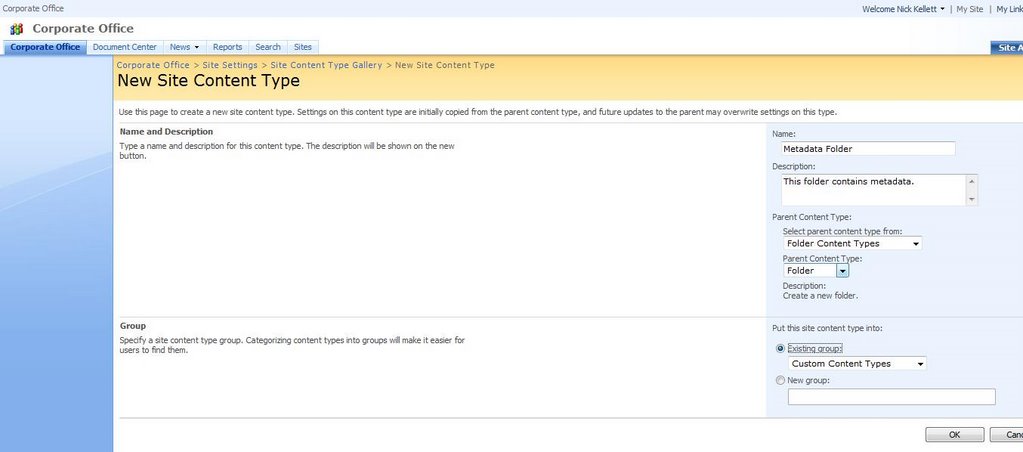
If you want to apply metadata to folders in SharePoint 2007 document libraries, you can create a custom content type with custom columns on it. Simply create a new custom content type at the root of your site collection, and select "Folder Content Types" from the "Select parent content type from" dropdown box, and "Folder" from the "Parent Content Type" filtered list.


Then, add your custom columns to this content type. These will be the metadata fields that appear when a user creates a new metadata folder.

Go back to the Library settings, and select "Advanced Settings". Make sure you enable the "Manage content types" option. Also remove the ability to "Allow users to create new folders". This prevents them from adding generic folders and forces them to select your metadata-driven ones.

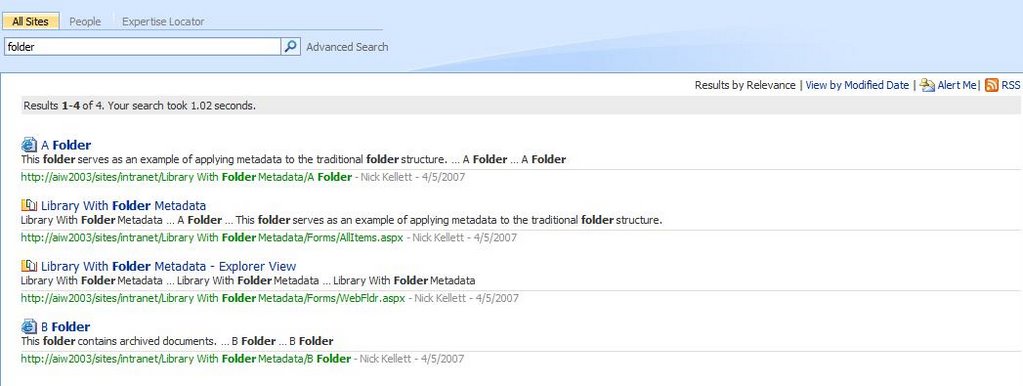
Now on the New dropdown on the library, users can select your "Metadata Folder". Doing so will prompt them to enter the metadata you have applied to it. Folder information will be displayed in the library views, although you may have to edit the current view and select the new columns for display. Of course results will also appear in the Search Results, once a crawl has been made.

Thursday, November 23, 2006

Using Single Signon with Database Credentials

This one was a real puzzle. I was able to get a BDC application working using RevertToSelf credentials but wanted to use a secure database account so that thousands of users didn’t have to have accounts in SharePoint. Instead, all domain users would access the BDC LOB using a dedicated SQL Server account.


Obviously the Single Signon was required but the SDK documentation and samples are, how to put it – a little vague? Not much information is available on the MegaHyperIntraWeb either. Eventually I got it working with some help from a fellow programmer, Christopher Bowman. Hopefully these steps will help others. Please send me some feedback on your experiences with this!


1. First, make sure you can connect to your BDC Line-Of-Business app using PassThrough or RevertToSelf authentication first, even if it’s to one column from a single table, just to be sure that your BDC metadata is correct.
2. Enable the Single Sign on service. Go to Services and set Microsoft Single Signon to start automatically. Give it a domain account as an identity.
3. Go to Operations in the SharePoint Configuration site. Click “Manage Single Signon” and sign in using the identity account in step 2.

4. Click on “Manage Server Settings” to create a new SSO database.
5. Click on “Manage settings for enterprise application definitions” to create a new Single Sign On application. The name you choose will be referred to later in the BDC application definition. For Account Type, choose “Group” so that all users will log in using the same database user id and password. Don’t select the “Use Windows Authentication” checkbox. The fields you fill out here are the credentials you need to pass to your application. In this case we are trying to authenticate to our LOB application’s SQL Server database using the connection string, so “Field 1” is called “User ID” and “Field 2” will be “Password”.

6. Still in the “Manage Single Signon” section, go to “Manage Account Information for enterprise application definitions” and select the application you just created. Put “\Domain Users” as the group that will try to authenticate using SSO. Finally, fill out the User ID and Password that you will connect to the LOB database with. Make sure this account exists in the LOB SQL Server database and has rights to the particular LOB db. I think it only needs Public rights but if you are connecting to stored procs using the BDC you may need execute permissions. If you get stuck try making this account a db owner of the LOB database.
7. Now it’s time to change your BDC application definition to use SSO and database credentials. Here are the settings you need:
<LobSystemInstance Name="LOB_INSTANCE_NAME" >
<Properties>
<Property Name="AuthenticationMode" Type="System.String">RdbCredentials</Property>
<Property Name="DatabaseAccessProvider" Type="System.String">SqlServer</Property>
<Property Name="RdbConnection Data Source" Type="System.String">Name of your db server</Property>
<Property Name="RdbConnection Initial Catalog" Type="System.String">Name of your LOB database</Property>
<Property Name="RdbConnection Integrated Security" Type="System.String">false</Property>
<Property Name="RdbConnection Pooling" Type="System.String">true</Property>
<Property Name="SsoApplicationId" Type="System.String">This is the name of the SSO Application you created in step 5</Property>
<Property Name="SsoProviderImplementation" Type="System.String">Microsoft.SharePoint.Portal.SingleSignon.SpsSsoProvider, Microsoft.SharePoint.Portal.SingleSignon, Version=12.0.0.0, Culture=neutral, PublicKeyToken=71e9bce111e9429c</Property>
</Properties>
</LobSystemInstance>

There are a couple of gotchas here: Note that the type name and namespace of the SsoProvider is Microsoft.SharePoint.Portal.SingleSignon ... all the examples show Microsoft.SharePoint.Portal.SingleSignOn with a capital “O” but this is incorrect and you will receive an error about type name not being found if you don’t change this.
The other gotcha is to disable SSPI. I do this explicitly here by setting “RdbConnection Integrated Security” to false but by default it is false anyway.
8. Upload the modified BDC application definition, remembering to increment the version number first.
9. Manage the permissions of your BDC Application, giving the “Domain Users” group “Execute” permission to the BDC. You may have to add the group first.
10. Manage the permissions of each your BDC Application’s entities, making sure that the “Domain Users” group is added and has “Execute” permissions here as well.
11. If you are already searching on your BDC Application, do a full crawl of that content source again so it updates the security permissions to prevent security trimming.
12. To test, try viewing a BDC web part using any account that does not specifically exist in the LOB SQL Server Database...if you can still view the data, the Single Signon worked!

kick it on SharePointKicks.com

Saturday, November 04, 2006

Data Source Agnosticism using the Business Data Catalog

There are a couple of main connection options that are available when using the Business Data Catalog (BDC) to access your non-SharePoint applications: a direct connection to databases, or to web services. The latter option is intriguing because we can couple it with some new .NET 2.0 functionality to add some real flexibility to our system.

While it may be tempting to hook the BDC straight up to a database, using a web service provides us with far more options. To begin with, the web service can just be populated with dummy data to get it up and running. Doing the same thing with a database would involve creating lots of tables and columns, making sure the contraints and other database objects are appropriate and functional, and then populating the dummy data either by hand (a potentially painful task) or by some code (which may or may not exist). Even if the database is already set up, connecting to the web service provides us with far more flexibility and even “future-proofing”.

For one thing, the web service guarantees that as long as future versions of the BDC support SOAP, they can continue to connect for years to come. This may or may not be true with databases (although it is hard to imagine SQL Server support being dropped!). The web service also allows us to provide disconnected data and can even mash together other data sources before feeding the BDC.

Finally, using a web service introduces a potentially huge flexibility option. I’m talking about using the new Provider model to populate the web service which the BDC will call. What are some of the advantages of this, and how would you do it?

The obvious advantage is that while you currently support Oracle or SQL Server, you may wish to provide yourself with the flexibility of using an alternative data source. Data Source Agnosticism, while a noble goal, has always been problematic due to the complexity of writing and maintaining the code. New to .NET 2.0, the Provider model is essentially a combination of Abstract Factory pattern with an XML configuration file. The burden of writing agnostic code is vastly reduced. After your first attempt to create a custom provider, the number of places you will want to use Data Agnostic Code will blossom!

To begin with, creating a custom provider is not a lot more work than usual. You need to create a web application that will expose the web service. The code of the web service will call a custom provider that will return data in some format. The web service is likely to just expose this directly through its method stub, although it could do various interesting things, such as validation, caching, and even mashing up a variety of data sources into one resulting data set. The BDC will then call the web service using XML that you’ve written. I’ll try to put together a working example shortly.
No More Silos!
Silos are only good when you're a farmer. One of the most significant additions to MOSS 2007 is the Business Data Catalog, or BDC. This is a shared service that allows you to create metadata describing how to connect to a variety of data sources and send or receive information from them. Out of the box it allows you to connect to a variety of data sources ranging from Oracle and SQL Server to web services. Because it is a metadata-driven abstraction, it delegates to the appropriate ADO.NET provider when performing the actual querying of the data.

The Business Data Catalog is good news because it reduces the amount of data silos that exist out there. Most organizations have dozens of small “one-off” applications that were developed to suit short-term tactical needs but have never gone away. They become headaches for IT staff and a real problem when figuring out how to retain their valuable data without going through hoops maintaining their aging or non-standard systems.

The BDC is a valuable way of surfacing their data through a standard API while reducing much of the development overhead. Once the metadata API has been written telling SharePoint how to connect to your legacy database, there is a BDC object model you can use to quickly and easily access your legacy data sources. Because this is standardized, your developers don’t need to know what the legacy data source looks like, or even what it is. They can spend all their time leveraging its data.

Soon your legacy data will start popping up on SharePoint team sites, to the delight of your clients!