Showing posts with label bugs. Show all posts

Saturday, December 31, 2011

Project Server 2010: Bug When Creating PWA Project Sites after CU patches are Installed

We applied the latest Cumulative Updates to our SharePoint installation after doing some testing, and immediately ran into an error trying to create Project Server 2010 project sites.

Project Site Provisioning Settings (/pwa/_layouts/pwa/Admin/WorkspaceProvisioningSettings.aspx) had the default web app set appropriately and was set to auto-provision project sites (and this had been working for a year).

However when viewing the Project Sites from the Project Sites admin (/pwa/_layouts/pwa/Admin/ManageWSS.aspx) it showed there wasn't a Project Site.

When we tried to create the Project Site manually it said the site had already been created. The errror in the event log was as follows:

PSError: WSSCreateSiteFailure (16400) project server

After some testing I realized the error was being caused by some custom site templates we were using. They had been corrupted by the Cumulative Updates we had installed.

The fix is simple: I recreated the templates from the basic Microsoft Project Site template, resaved them into the PWA site collection’s Solutions Gallery, and can now auto-provision. I was also able to manually recreate the project sites for the projects that were missing them.

Hope that helps!

Monday, November 14, 2011

SharePoint Bug: 2010 Menus Not Working in IE9

I setup a new laptop on the weekend and this morning found a crazy bug – my SharePoint 2010 and Project Server 2010 menus and ribbon would not work at all, basically rendering my laptop useless unless I could figure this out.

After much poking around in F12 Developer Tools and searching around the web, I finally figured out the solution myself.

I had dragged the IE icon to my taskbar and for some reason it was loading the 32 bit version of IE instead of 64 bit. After starting IE using the 64 bit version all was well.

I’m not sure what the exact issue was – I have used both 32bit and 64 bit IE 8 and 9 browsers on other computers and never had any issues loading SharePoint 2010 menu items.

Anyway hope that helps someone else.

Monday, July 11, 2011

SharePoint 2007 Search Quirk–Hit Highlighting on Integers

While working on a SharePoint 2007 custom search project we found an interesting little quirk in the search engine.

We were using the XML iFilter rather than the regular html iFilter due to a requirement to tightly constrain some date metadata as type datetime (with the OOTB filter SharePoint was returning these as text and not allowing proper date range filtering).

While searching for numbers contained within text, if the number was on its own line of text and not preceded by anything else, the result would return correctly but hit-highlighting was not applied.

However, if we put any text at all in front of the numbers, the hit-highlighting applies perfectly.

Therefore the workaround was simply to alter the text that was being displayed to include at least one letter or word before the integers in the line.

Wednesday, September 01, 2010

SharePoint 2010: Search Service is not able to connect to the machine that hosts the administration component

Had a strange Search error in a new SharePoint 2010 farm:

The search service is not able to connect to the machine that hosts the administration component. Verify that the administration component 'bae8d161-c132-4570-aa0d-57baf6cf9d9b' in search application 'Search Service Application 1' is in a good state and try again."

I was unable to start any crawls as a result.

The search services were all started correctly but in the Application Services window it showed “Error”. The fix for me was to click on the Search Service Application name in the list of Application Services, choose Properties on the ribbon above, and change the Application Pool to another one (in my case, from SharePoint Web Services Default app pool to SharePoint Web Services System).

Hope it helps someone.

Tuesday, July 20, 2010

SharePoint Workspace 2010 “exceeds the lookup column threshold”

While trying to sync to a SharePoint site using SharePoint Workspace 2010, you may bump into the following strange error: "The query cannot be completed because the number of lookup columns it contains exceeds the lookup column threshold"

This is due to SharePoint’s new resource throttling settings for managing large lists. There is an easy fix in Central Administration.

Go to Central Administration and then browse to Application Management > Manage Web Application.  Select the web application you need.

In General Settings choose Resource Throttling. Set the value in the List View Lookup Threshold textbox to a higher value (equal to or greater than the number of site columns you are using on the list where you saw the error).

I bumped into this with Workspace but this error may appear for other client applications / systems that use SharePoint 2010 as a platform, and are trying to lookup lists that have more site columns than the throttle setting.

Sunday, June 13, 2010

MOSS 2007 Service Pack 2 Backup May Lock and Remove Site Actions Options

We had a very strange error suddenly appear on a client’s site last week – we got the following email:

Anyone know what's happening with site actions menu on the top level site of [the website]? I have limited menu options - i.e. there is no site actions, edit page, create page, create site, etc.

Our support team looked into this and figured out the following:

The issue appeared on the top-level site collection due it being set to “Read-Only” after a backup locked the site and then failed to release it. Changing it to “Not locked” immediately restored the menus.

This is what our guys had to say:

In SP2, Microsoft added a feature to STSADM to automatically lock the site collection during a backup:

http://technet.microsoft.com/en-us/library/cc287967(office.12).aspx

“In Service Pack 2 for SharePoint Products and Technologies, site collections are automatically locked as read-only before a backup process occurs. Therefore, there is no need to use the Setsitelock: Stsadm operation (Windows SharePoint Services) operation. If you do not want site collections to be locked as read-only, you must specify the nositelock parameter that is available in Windows SharePoint Services 3.0 with Service Pack 2 (SP2).”

It is likely that some kind of error or exception interrupted the scheduled backup, and as a result the lock was not removed.

Here is the page link: http://[your address]/_admin/sitequota.aspx.

Hope that helps others out!

Wednesday, June 09, 2010

SharePoint 2010 Bug: Cannot Rename Title On Validated List


My colleague David has noticed what seems to be a bug in SharePoint 2010 on lists that have validation applied to them. If you try to rename the title, it will cause an error. The "fix" is to remove the validation and then the renaming can occur as normal. We're doing some more testing to see if there is a workaround. It would be a shame as we are already using and enjoying the list validation functionality.


I'll update if we find a workaround.

Saturday, April 03, 2010

SharePoint 2010 Beta Migration Gotcha – SSP Errors

One of the big changes to SharePoint 2010 is the replacement of the Shared Service Provider concept with a series of application services.

Essentially instead of a central managed “pool” or bundle of application services such as Excel, User Profile, Search, and BDC, the new model allows farm administrators to turn on or off (and separately configure) an infinite variety of services that can add extra functionality to their farm.

This is a much more flexible model.

This new model does cause one problem if you are doing “in-place” migrations of existing 2007 portals to 2010 using the beta bits. For some reason, the Shared Service Provider database does get upgraded to 2010 but it causes a number of portal errors while it does so.

You’ll find these in your upgrade log file, in the 14 hive. These vary from User Profile errors to “certificate” errors. One common error looks like this:

[OWSTIMER] [UserProfileSharedResourceProvider12Sequence] [ERROR] [1/8/2010 9:23:42 AM]: Action 14.0.1.0 of Microsoft.Office.Server.Upgrade.UserProfileSharedResourceProvider12Sequence failed.

[OWSTIMER] [UserProfileSharedResourceProvider12Sequence] [ERROR] [1/8/2010 9:23:42 AM]: Inner Exception: There are no online service instances for this application.

The “fix” is to delete all Shared Service Providers from your 2007 farm BEFORE doing the in place upgrade. The sts command to do this is:

stsadm -o deletessp -title SSP -force

This isn’t a big deal - this is only a beta problem.I very much doubt this will be the case in RTM which is due next month.

Hope that helps.

Tuesday, May 19, 2009

WCF WTF

Today I was working on a WCF application integration layer for my framework. For some bizarre reason, no matter how many times I updated the service contract and rebuilt my client service references, I never got the latest version.

Specifically, I was trying to call the following method:

public void CreatePages(IList<WebPageDTO> pagesToCreate)

The WebPageDTO was declared (temporarily) in the WCF project. I put DataContract and DataMember on it, the project built fine, and I could even add a reference to it from a client application. However, I could never update the reference from my clients, and when trying to view the service directly I would get this error:

The type '[namespace].[servicename]', provided as the Service attribute value in the ServiceHost directive could not be found.

Finally, I had to modify the method signature to RETURN WebPageDTO – which I didn’t want to do. However, that fixed the service reference and now I can update it. Now I have switched the method stub back to return a custom ServiceResponse object, and that also works.

Bit of a head scratcher. I don’t fully understand why this is happening. Anyone know?

Friday, February 20, 2009

Using LDAP Authentication With A SharePoint Intranet Is A Very Bad Idea

A couple of years ago I wrote an article explaining step-by-step how to integrate Novell e-Directory with SharePoint. At the time it was pretty much the only available information on the web. Since then I have frequently been asked for tips on integrating LDAP with SharePoint intranets, most recently last week. So I thought I would provide some updated advice:

Run away! Run far, far away.

  1. Get one of your colleagues to distract your boss.
  2. Climb out of your office window.
  3. Head for the nearest bus, train station, or airport.
  4. Change your name.

If somehow your boss or client finds you and demands that you integrate LDAP with the SharePoint intranet, explain why it's a very bad idea.

Why is it a Very Bad Idea?


From a technical perspective LDAP integration is really just Forms Based Authentication (FBA) - you are passing in a username and password to SharePoint, and these happen to be authenticated via LDAP calls to an identity store somewhere.

Using LDAP, logging into your SharePoint portal will look like this:
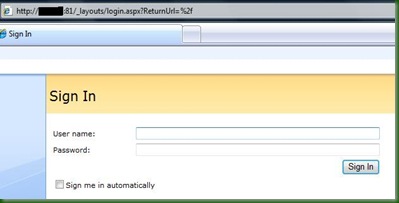
LDAP Signin - Additional Zone

Doing this is a big mistake!

Reason #1: Time Spent Tinkering

Now in order to do this, there are a variety of technical steps you need to take. If you run into problems anywhere along the way, you will spend your valuable time trying to figure out if the problem is in your Role and Membership provider settings, in your various web.configs, your LDAP query, or something else you have to enable in SharePoint.

This means you are spending your effort (and your client or employer's money) struggling to implement something that with Active Directory would "just work".

Some might argue that this isn't a great reason - after all plenty of time and effort goes into modifying SharePoint to accomplish other requirements. But any effort you expend making SharePoint work without AD is time you could be spending modifying SharePoint to address problems the business actually cares about. The business does not care that its credentials are currently stored in Novell eDirectory and SharePoint prefers them in AD.

Reason #2: Your SharePoint Intranet Won't Work The Way You Expect

Portal users expect seamless integration and functionality when they are using SharePoint for the intranet, because that's what all the marketing materials teach them to expect.

Building an intranet without Active Directory can lead to some surprising and annoying side effects. Out of the box web parts or controls like the Organizational Hierarchy don't work very well without Active Directory. You can make them
work with ADAM or by exploring 3rd party replacements but you'll have to test any portal functionality you think you are likely to use.

Also, the user experience with Microsoft Office integration can become a problem. Open up Word or Excel when logged in using LDAP credentials and you might see this:

LDAP Word Integration Problem

It's fun explaining that to an end user!

SharePoint Designer is also tricky - it wants to automatically authenticate you using windows credentials, and throws errors when it runs into forms based authentication.

I'm not claiming that these issues are insurmountable, but collectively they introduce new bugs, development, testing, and management issues, increase cost and risk, and potentially annoy your users. Is it really worth it?

How Is that Different from Internet or Extranet Environments?

Many extranet and internet environments use Forms Based Authentication without problems. Administrators or installers have to modify SharePoint to work in these zones using Role and Membership providers...So why is it ok for those environments to use FBA but not the Intranet?

Again, it's a question of user expectations. When a user logs on to an extranet or internet site, they don't expect seamless Office integration and automatic access to file shares using their desktop credentials. When they use SharePoint intranets, they do expect these conveniences.

All the literature and sales material tells them that they should be able to interact directly with SharePoint intranets via Outlook, Word, and Excel - without annoying popup boxes and workarounds. They expect to be able to use all of the out of the box controls and web parts like the Organizational Hierarchy, and don't want to hear excuses like "that works best with Active Directory so we can't use that now".

So What Should You Do?

I recommend synchronizing your e-Directory identity information into an Active Directory domain and building SharePoint on top of that.

There are a variety of ways to do this but one way you can investigate is via Novell's IDM which can synchronize between e-Directory and Active Directory.  Your e-Directory is still the master identity store, but any e-Directory changes get automatically sync' ed to the child Active Directory. Here's a link that might help: http://www.novell.com/coolsolutions/appnote/18349.html

You can definitely make SharePoint use multiple identity providers - but the reality is your SharePoint portal becomes much more flaky and expensive to manage. These days there are many ways to populate Active Directory from some other identity store - I always recommend that since it is less effort and risk down the road, and (probably) less cost as well.

SharePoint is complicated enough without adding to the challenges.

Of course your mileage might vary. If you have attempted (or succeeded) in integrating a SharePoint intranet with LDAP what were your experiences? Besides IDM, are there other good ways to synchronize Active Directory with a master identity store?

Thursday, July 17, 2008

Follow up to "No authority could be contacted for authentication"

Anthony Moore, an IT Manager at LivePoint, provided me with some more understanding of the root causes of yesterday's demo machine errors.

Each machine in a domain has a password, (exactly like your username / password) and the passwords are reset periodically as well automatically though Active Directory...

If you restore an image of a machine to a prior state, the password in active directory becomes out of sync with [what] is stored in the machine, and the...issue can occur.

I imagine this isn't news to any Active Directory gurus out there but it clears things up for me. Going forward I will be including the AD Domain Controller in the server snapshots and rolling it back alongside the SharePoint virtual machines.

Hope this helps someone else. Thanks for the insight, Anthony!

Wednesday, July 16, 2008

"No authority could be contacted for authentication."

I have been giving weekly webinars using a demo environment that mimics 3 SharePoint farms (2 x MOSS 2007, 1 x SPS 2003). While prepping for tomorrow's demo I ran into some very strange SharePoint behaviour.

For no apparent reason, the default site collections no longer worked - they failed to load and couldn't see each other via a web browser. However, on both 2007 farms, I could still see and use the remote internet site collections just fine (using anonymous authentication on port 8000).

In the Event Viewer, various errors started complaining about DCOM saying things like

Reason: The trust relationship between this workstation and the primary domain failed. (Exception from HRESULT: 0x800706FD)

And when I viewed the other sites in the browser, I would get "Service Unavailable" errors and, eventually:

No authority could be contacted for authentication.

These errors, plus the fact that I could still use anonymous authentication, obviously pointed to something beyond SharePoint being the culprit. When these kind of authentication errors abound you don't have to look far beyond Active Directory to find the guilty puppy.

I eventually ran across this very helpful post by Noman Juzar Lakdawala on the ASP.NET forums:  http://forums.asp.net/t/986545.aspx

I followed his instructions and removed my servers one at a time from the domain, deleted the entry in the Domain Controller, and then readded them. Everything works now!

Not sure why AD got corrupted in the first place, so I will continue testing, but so far so good.  Thanks Noman!

Saturday, January 12, 2008

Anonymously Searching User Profiles in MOSS

I had a requirement the other day to enable anonymous access on an internal portal and allow users to search across the user profile database - to create what was essentially a corporate directory.

The anonymous "core requirement" was to ensure users didn't have to log in when trying to look up their colleagues (they are using the dreaded Novell e-Directory which does not play nicely with SharePoint). Anyway this time the issue wasn't importing the e-Directory accounts but rather a 401 - Unauthorized error that kept appearing when trying to view the people results.

I tried the following things:

  • I enabled Anonymous access first on the Search Centre lists and libraries and eventually on the entire site collection
  • I added IUSR as a member of Intranet Viewers and made sure that in the policy permissions for anonymous users they had a limited read policy setup
  • I tried to add IUSR_ to the SSP Settings - "Process Accounts with access to this SSP"
  • I manually turned on anonymous access to some of the individual mysite site collections that I was trying to view
  • I modified the My Site settings in the SSP to allow IUSR to be part of the default readers group and for any existing My Sites. Then I had to go to that My Sites collection and give READ permissions directly to the IUSR account
  • I created a custom permission level called "Anonymous View" in the site collection, added View Application Pages, View Items, View Pages, and Open permissions. Then I added the anonymous view permission in the "Intranet Visitors" group to ensure they could get these extra permissions.

Nothing worked. If I tried getting results back directly from the People Search page, the 401 error would instantly appear. For some reason though I could perform a user profile search if I used the regular All Items search with the People scope. However when clicking on the results the 401 error would subsequently appear.

The conclusion: anonymously accessing user profile data does not seem to be supported out of the box. I suppose some custom code might fix this but my goal was to adhere to the vanilla SharePoint as much as possible.

This issue seems to be by design - the user profile data includes colleague information, social relevance algorithms, and organizational hierarchies. None of that information would pertain to the anonymous user account. Additionally, the actual user profile data may be considered sensitive.

Has anyone else come across this limitation, and if so how did you resolve it please?

Wednesday, December 12, 2007

SharePoint Service Pack 1 Released

SharePoint Service Pack 1 was released yesterday.

Joel Oleson has a detailed post on the update at http://feeds.feedburner.com/~r/sharepointteamblog/~3/198847357/announcing-the-release-of-wss-3-0-sp1-and-office-sharepoint-server-2007-sp1.aspx.

Joel mentions that a special page has been created on TechNet: http://technet.microsoft.com/en-us/office/sharepointserver/bb735839.aspx to help people evaluate and apply the service pack. He encourages everyone to look before they leap when it comes to applying the service pack.

The SP download is here: http://www.microsoft.com/downloads/details.aspx?FamilyId=9EC51594-992C-4165-A997-25DA01F388F5&displaylang=en

Thursday, September 13, 2007

Attack Of The Blob!


(Image taken from WikiPedia's entry on The Blob!)

Yesterday I had a frustrating day trying to modify a CSS file for a SharePoint look and feel task.


For some reason, no matter what I did, the CSS never refreshed in the browser. When viewed in SharePoint Designer it did show the updated version, but no amount of IIS resets, file deletion, or browser cache clearing prevented my web browsers (both Internet Explorer and Firefox) from rendering the old version.

Eventually I happened to look on the file system and notice a folder on the root called "blobcache". Aha! I was using a new Virtual Machine and unbeknownst to me Blob Caching had been enabled to improve performance.

Inside this blob cache folder I found my css file with a .cache file extension on the end of it. I tried to delete manually but it then started to show "File Not Found." errors.

The solution was to flush the blob cache. The option is on the site collection's Site Settings. Select "Site Collection Object Cache" and then click "Force this server to reset its disk based cache."

The BlobCache is enabled in the web.config file and looks like this:


<BlobCache location="C:\blobCache" path="\.(gifjpgpngcssjs)$" maxSize="10" enabled="true" />


I could just remove the css reference from the path but during development I think the better approach is to just to set enabled to false.

Interesting note: David Marsh and I think SharePoint Designer was able to view the newly deployed file because it was using WebDav and so was hitting the database rather than having IIS redirect it to the BLOB cache which is what happened to the browsers.

Thursday, August 30, 2007

Hotfix City

I was cleaning up a portal today and ran into a wide variety of errors. Several of them turned out to have the same root cause. The symptoms were wildly varying event errors like this:

Microsoft.Office.Server.Administration.ApplicationServerAdministrationServiceJob threw an exception:

"Message: Old format or invalid type library"

Or

Microsoft.Office.Server.Administration.ApplicationServerAdministrationServiceJob threw an exception:

"Message: Not Enough Storage"

The resolution required not one but two hotfixes, both of which target the .NET 2.0 framework.

I applied the first hotfix, KB 923028, after reading about it on Gayan Peiris' blog. After rebooting I started getting another error which read:

Unable to open shim database version registry key - v2.0.50727.00000

Err....what?  Speculating wildly here (something I'm good at), I'm guessing the "shim database" was holding some key in the windows registry that the Timer job wanted to know about but couldn't get at.

Anyhow, I did a quick search to figure out how to resolve it, and there again Gayan's blog popped up, suggesting I download and run KB 918642. I figure he was two steps ahead of me the whole way!

By the way, Gayan's the new SharePoint MVP at Microsoft in Sydney. Check out his blog here. It's got a huge amount of SharePoint fixes. Hopefully you won't need any of them!

Saturday, August 04, 2007

Currently Team Foundation Server uses Windows SharePoint Services sites to host project sites. This provides a useful central point to collect development documentation, workspaces, meeting spaces, and allows people without TFS to at least view the related information (although now there is an additional option, the very cool TeamPlain Web Access for Team System, which is free for all licensed TFS users!).


Unfortunately the current version only supports WSS 2.0 sites. There are some work arounds, but they can be flaky.

The good news is that TFS 2008 will support WSS 3 sites - Abdelhamid Abdou talks about this on his blog in this posting. Better yet, when you setup TFS you are now given the choice to have the SharePoint integration on the same box, or point to an existing SharePoint application on another server.

To learn more about the current workaround, you can read Brian Keller's blog posting here. Brian is a Technical Evangelist for TFS and makes it clear that any modifications to current TFS installations to make them work with WSS 3 are hacks and may not be supported. He does point to Mike Glaser who blogged extensively about how to upgrade to WSS 3 sites.

Incidentally, as of July 30, Readify in Australia has released TFS hosting "in the cloud"! This could be very huge for small ISVs or consultants that want to have enterprise development tools without the upfront expense or maintenance effort! The service starts at $995 AUD a month and more info can be found at http://www.tfsnow.com/.

Thursday, July 12, 2007

Today I was creating a workflow in Visual Studio so I could repackage it with content types and lists, rather than using SharePoint Designer where the workflow has to be applied to a specific list.

Whenever I tried to create a new SharePoint Sequential Workflow Library project, I got the error: "The project type is not supported by this installation". Turns out I had a pre-release version of the Visual Studio 2005 Extensions for .Net Framework 3.0 (Windows Workflow Foundation) - beta 1.2 to be precise. After uninstalling and reinstalling the release version, available here, I could create the workflow project.

I'm currently following Nick Swan's excellent blog postings about how to create and deploy SharePoint workflows in Visual Studio: SharePoint 2007 Workflow with Visual Studio 2005 + InfoPath 2007 (RTM VERSION!) and Deploying our SharePoint 2007 Workflow with Visual Studio 2005 + InfoPath 2007 (RTM VERSION!) .

Saturday, July 07, 2007


This week the trial license on one of my virtual servers expired. I tried to enter a valid license key, but it said: "Failure! Your license conversion operation failed. Check the error logs for details."
Now this sounded like bad news. A quick search on the web turned up two postings on how to fix this: Tony on developerfood, and Shane Young at the SharePoint Farmer's Almanac.

The solution is very simple:
1) Restart the WSS Timer service (in the Services MMC)
2) Restart IIS

Now I can log back in to the Portal without problems. As the 180-day trial MOSS licenses start to expire there will probably be more occurrences of this bug.

Friday, June 29, 2007

I mentioned in a previous post that I was having trouble with Forms Based Authentication (Open LDAP) into SharePoint, or more specifically with the Client Integration part of it (opening Word and Excel when logged in using LDAP). I've received confirmation from Microsoft that this is by design: IIS and Office will only integrate using NTFS authentication.

Now, having said this, and having personally seen it not working, there is a chance you can still use Office integration and FBA. I'm linking to Mike Fitzmaurice's blog where he discusses this issue in detail: FitzBlog.

Willie Rust on his blog mentions that checking the "Sign me in automatically" checkbox when you log in using Forms Based Authentication will save a persistent cookie to your desktop.


I did try this, but the browser wouldn't let me sign in if tried this...It was either log in successfully without setting a persistent cookie; or fail to enter the site at all. So your mileage may vary. Good luck!