Showing posts with label business data catalogue. Show all posts

Thursday, August 23, 2007

The Microsoft SharePoint Team has just announced a major release to the SDKs - version 1.2 of each. The full details are here: http://blogs.msdn.com/randalli/archive/2007/08/22/just-published-major-update-to-the-moss-and-wss-downloadable-sdks-8-22-2007.aspx

This is wonderful news - not only will it make developing to the object model more understandable but there are numerous samples and, best of all, a BDC editor tool! Check this page out:

The Business Data Catalog Definition Editor provides a visual tool for creating an Application Definition for BDC in MOSS 2007. Features include:

  • Underlying XML is abstracted by the design surface and properties window
  • Drag and drop web methods, tables, or views to create line of business (LOB) connections.
  • Entities and methods are created automatically from database metadata and WSDLs.
  • Additional method instances can be added to further enhance the database or web service connection.
  • Method instances can be tested from within the tool, enabling incremental development of LOB connections
Background

Currently, writing an application definition to connect the BDC to a LOB system is a manual process. This requires an understanding of both how the LOB system is configured and what must be included in the XML to satisfy the BDC. Having a tool to simplify this process not only lowers the initial knowledge threshold for administering the BDC, it also lessens the required work of the user (such as testing, making modifications, etc.).

[...]

Highlights
  • Tool supports databases (SQL, Oracle, OLEDB, and ODBC) and web services
  • Drag and drop design surface for selecting DB tables or web methods:
  • Metadata is automatically extracted from databases by dragging and dropping tables
  • Web Services require a few additional steps to completely configure the connection
  • Users can import and export Application Definition XML files
  • Users are able to test method instances incrementally from within the tool
  • The tool is not required to run on a web front-end
  • Associations are created automatically when foreign keys are selected; they can also be created easily for web services by adding an Association method instance

Objectively speaking, the SDK and tool release just made life 100% easier (32.4% of the time)1. You can't argue with those numbers!

The Microsoft team has also stated that it has doubled the resources working on the SDKs, which means we can look forward to even more improvements in the future. They're obviously listening to the community -they even make that point in their announcement - and it's very welcome indeed.

1 Actual results may vary.

Wednesday, August 22, 2007

Yesterday the August meeting of the Sydney SharePoint User Group was held. The speakers were Han Duong and Brad Saide, both from LivePoint.

Han spoke about Themes in SharePoint. He gave a quick example of how to change a SharePoint site using the existing Themes in a MOSS installation, and suggested some tools, such as Heather Solomon's blog posting about all the SharePoint CSS classes, Firebug and web developer plugins for FireFox, and the IE Developer toolbar for Internet Explorer.

He then showed how to customize Themes using SharePoint Designer.

  1. The first step is to copy an existing theme set from the Office 12 hive on the file system (<installation drive>\Program Files\Common Files\Microsoft Shared\web server extensions\12\Templates\Themes) and rename it to the name of the new theme you want to create ([Theme Name]).
  2. Next, modify the name of the .info file contained within this new theme folder to be the [Theme Name].info. This is what SharePoint will look for when it tries to load your theme.
  3. Next step is to tell it about the new theme: to do this go to 1033 folder in your hive and edit the SPThemes.XML file. Just copy one of the existing Theme element entries and rename it to reference your theme name.
  4. Create a thumbnail for the them by copying an existing theme thumbnail from \Templates\Images and renaming it to whatever you specified in the SPThemes file.
  5. Reset IIS
  6. View the Themes in the Site Settings section of the SharePoint portal. You can apply your new custom theme to a site and then take a screenshot; you can then use this as the thumbnail to overwrite the one you copied.

An interesting point Han mentioned is that when you make changes to Theme css files in SharePoint Designer, it is making those css changes to the database. However, on initiation or cache expiry the the css and other theme information is loaded directly from the file system.

Therefore any changes made subsequently to the file system will overwrite the work you've done in SharePoint Designer. So he suggested that once you've made any changes you are happy with in SharePoint Designer, immediately copy them into the file system version of the css file to protect yourself.

Han mentioned that Themes are a good fit for simple design changes to the look of a SharePoint site, while Master Pages are more useful when changing the functionality of the site or the way it is organized.

Another good tip that was raised was using Themes as a quick way to mock up a client's site when doing demonstrations as it helps them relate to what they are seeing (rather than just viewing the out-of-the-box SharePoint installation).


Next, Brad gave us an overview of the Business Data Catalogue in MOSS 2007 Enterprise, and showed how it can be used to surface Line-of-Business information and provide dashboard views of disparate data.

He first explained the challenges of integration line-of-business code into SharePoint. These challenges include:

  • Developers have to write integration code
  • They communicate directly with the native API
  • Each attempt is a single-purpose effort
  • There is an ongoing maintenance and update burden
  • It is difficult to create "one place to go" when there data is in many places
  • Each new business system requires new effort

The BDC is a good solution for all of this. It provides a unified, consistent way to expose data within SharePoint by surfacing it from backend applications. It is declarative, requiring no code. It is also a centrally-managed system. I would also suggest it is "universal" or a contract that all developers will follow.

Brad pointed out the things the Business Data Catalogue is good for: surfacing LOB data, mashing up the information from multiple Line of Business apps, searching on all of this data at the same time, and pulling LOB data into libraries and lists where it can add to the existing portal information, and it can help populate user profile information.

What it isn't good for:

  • It isn't a replacement for existing Line of Business functionality
  • It isn't transactional or a message broker (a la BizTalk)
  • It doesn't do data transformation (SQL SSIS)
  • It isn't a data adapter (iWay)

Brad then presented a demo of how the BDC could surface HR system data stored in Oracle onto the MOSS portal. He showed how easy it was to use the free version of BDC Meta Man to build the initial BDC app schema file, and showed us how the BDC web parts could present and filter this information.

Updates to the Oracle database appeared upon refresh, and the BDC information could be added as metadata to existing lists and libraries. BDC Actions allowed HR staff to view the profile data of the records or even launch custom actions using URLS, such as launching a window to search on Seek.com for job candidates when a particular job title was selected on the SharePoint page.

I think the BDC is one of the best features of Office 2007 with some of the least documentation and fewest tools! A painful paradox.

Both Brad and Han did a good job and I think we all enjoyed the session.

Thursday, July 26, 2007

Another day, another SharePoint learning experience for me...This time one of my SharePoint colleagues at work, Viraf, was trying to connect to an Oracle database using the BDC. I'd had some previous success using database credentials authentication to a SQL Server-backed CRM application so he and I put our heads together to get this BDC Oracle connection working.

Because we didn't have Oracle installed anywhere initially, we began by mocking up one of the client's tables in a temporary SQL Server 2005 database and using the steps in my previous post to connect to it. Since those instructions weren't using Integrated Windows Authentication and used plain old SQL command text, we figured this would be a pretty good head start. The only major change to the BDC Schema App file was the line:

<Property Name="DatabaseAccessProvider" Type="System.String">SqlServer</Property>

had to change to:

<Property Name="DatabaseAccessProvider" Type="System.String">Oracle</Property>

Any table names referenced in the SQL Command text in the App schema had to be prefaced with the database schema name; ex:

SELECT Field1, Field2 FROM MySchemaName.TableName

Unfortunately although all was right with the BDC schema, there was an authentication error when trying this against the client's Oracle instance. The culprit was the Single Signon database which managed the connection.

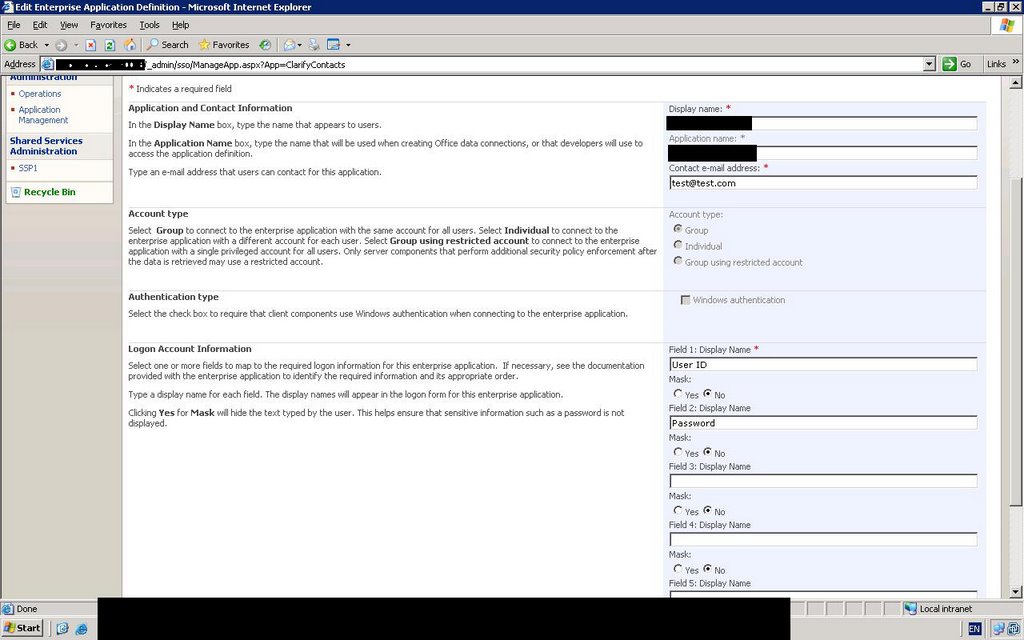
In the SQL Server test database Viraf was using, the only fields required in the Single Signon Application Schema were User Id and Password. However, Oracle requires one more field (Field 3) to complete the Connection String: "Integrated Security".

After adding this, in the “Manage Single Signon” section, we went to “Manage Account Information for enterprise application definitions” and selected the application. We needed “\Domain Users” as the group that would authenticate using SSO (in other words, every SharePoint user would use this connection). Finally, we filled out the User Id field with the Oracle username, the Password field with the account password, and the Integrated Security field with the value "no".

Although we were able to get this running internally after Viraf set up an Oracle installation to prove this would work (it did), the deployment at the client site failed with the following error in the SharePoint log files:

System.Data.OracleClient requires Oracle client software version 8.1.7 or greater.

Viraf found the following article on Roy Tore Gurskevik's blog that seems to explain it: http://dotnetjunkies.com/WebLog/rtgurskevik/archive/2005/01/19/45958.aspx . The good news is that to reach this point a connection has to be happening and SSO reports that the connection string is being retrieved. We're awaiting official confirmation but it looks like this is an environmental issue.

Tuesday, July 03, 2007

After K2's BlackPearl demonstration a few weeks ago, I had a few questions. I contacted Josh Swihart at K2 and he and Anthony Petro, the Technical Product Manager, replied to me:

Question: I know the BlackPearl Report Builder uses Reporting Services – can these reports be exported and even hosted on a distinct Reporting Services server or hosted in SharePoint’s integrated Report Centre? The reason I ask is that a lot of Microsoft products - MOSS, Dynamics CRM - all use Reporting Services, so from a server topology perspective it would be great to have them all publish to the same RS server and manage things a little more centrally. Josh and Anthony: Yes, when you install BlackPearl you must provide information on which Reporting Services server you want to connect to. The Report Designer will use this server when you “publish” a report to RS. Once the report is in RS, you can use standard UI in RS, or compatible apps like SharePoint RS web parts, to view these reports.

Question: I wondered if the autogeneration of InfoPath forms using that Forms Designer item that Adriaan demonstrated would be available by Release-To-Market or shortly thereafter. This would be a nice-to-have for InfoPath 2007 development in conjunction with MOSS.
Josh and Anthony: The SharePoint integration wizards can use either ASP.NET or InfoPath forms server forms. Both technologies will have default forms that are installed with BlackPearl to be used for Instantiation, Association and Task Form. Note that there is more info on this in the SharePoint whitepaper. Additionally, we have added the Forms Generation Client Event which will allow you to generate ASP.net forms automatically for Process, XML and SmartObject data in the process. Post-RTM we will expand the forms generation client even to support autogeneration of InfoPath forms.

Question: I read this in one of the K2 Black Pearl pdf documents:
“K2 “BlackPearl” process information is availableto MOSS users through
integration with the MOSS Business Data Catalog (BDC). All process information is
searchable (security is respected) and can be exposed through list columns and
BDC web parts.”

Does this mean that for any custom workflow I create in K2, a BDC application schema is automatically generated for me to upload into the BDC Catalog? Or do I still have to create a schema for this by hand? It mentions “process information” - does that mean just the time it took the workflow to execute, the name of the originator, etc, or does it also expose SmartObject data and the like so that I can pull those into SharePoint via the BDC?
Josh and Anthony: We provide the ability to surface any SmartObject data through BDC - including process and activity data configured as SmartObjects. We have created a K2 Admin tab in SharePoint Central Administration to make it easy to identify which SmartObjects, and optionally their associations, should be exposed in BDC web parts and/or search. The BDC application metadata for connecting to the SmartObjects is automatically generated and configured as result of the actions on the admin page.

Thanks Josh and Anthony for taking the time to respond!I'll also mention again that there is a new community forum called K2 Underground for exactly these kinds of queries. There is also some documentation available on K2's blackpearl site which describes some of the new features. Plus there's a beta to download and play with!

K2 Underground is here: http://k2underground.com/. K2 Blackpearl website is here: http://www.k2.net/bp. You can send an email to beta2@k2.net to get your hands on the beta 2.

Monday, April 09, 2007

Sahil Malik has a great series of posts on the Business Data Catalog, including code samples and step-by-step tutorials. Check it out on his blog here.

Incidentally, if you haven't yet looked at his book "Pro ADO.Net 2.0", you may wish to pick up a copy. I bought one last year and have found it indispensable. It's easy to read and really gets into the details on not just the technical matters but the best practices and the issues you need to think about when working with data sources. I've already learned a lot from it.

One of the nice things about the Apress books is that they offer PDF versions as well, which is handy when you don't want to schlep dozens of hefty .NET books around.

Wednesday, April 04, 2007

If you're thinking of doing any Business Data Catalog work, do yourself an enormous favour and check out BDC Meta Man.Todd Baginski and Nick Swan have released this extremely useful GUI tool for quickly creating Business Data Catalog application schemas. I used Todd's earlier incarnation as the basis for an import of 10,000 Clarify CRM records . It simplified the process enormously, even in the early goings. Do yourself a favour and check out their work:
http://www.bdcmetaman.com/default.aspx

Thursday, November 23, 2006

Using Single Signon with Database Credentials

This one was a real puzzle. I was able to get a BDC application working using RevertToSelf credentials but wanted to use a secure database account so that thousands of users didn’t have to have accounts in SharePoint. Instead, all domain users would access the BDC LOB using a dedicated SQL Server account.


Obviously the Single Signon was required but the SDK documentation and samples are, how to put it – a little vague? Not much information is available on the MegaHyperIntraWeb either. Eventually I got it working with some help from a fellow programmer, Christopher Bowman. Hopefully these steps will help others. Please send me some feedback on your experiences with this!


1. First, make sure you can connect to your BDC Line-Of-Business app using PassThrough or RevertToSelf authentication first, even if it’s to one column from a single table, just to be sure that your BDC metadata is correct.
2. Enable the Single Sign on service. Go to Services and set Microsoft Single Signon to start automatically. Give it a domain account as an identity.
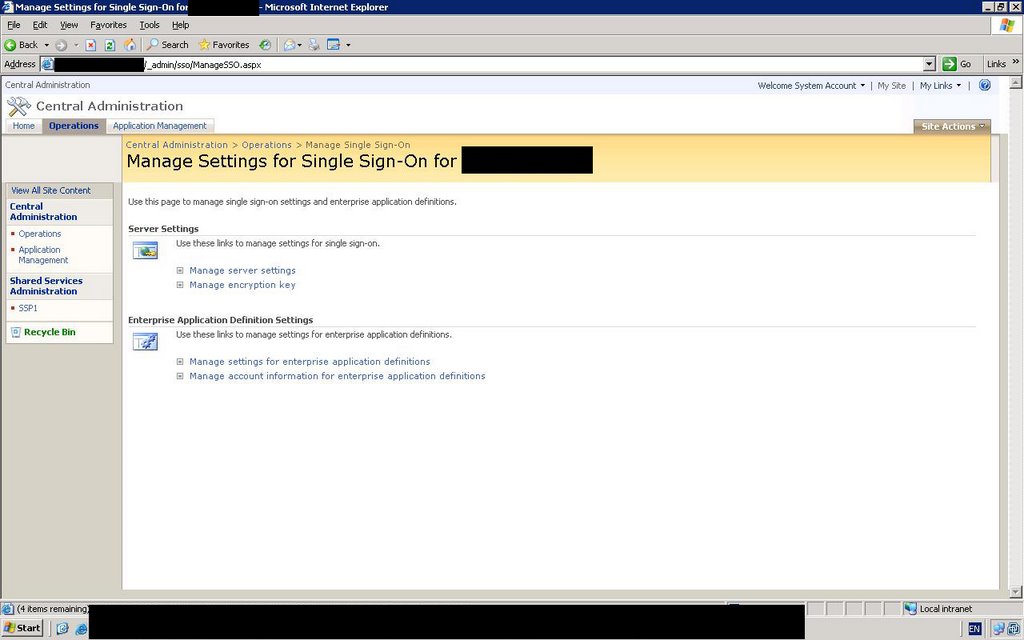
3. Go to Operations in the SharePoint Configuration site. Click “Manage Single Signon” and sign in using the identity account in step 2.

4. Click on “Manage Server Settings” to create a new SSO database.
5. Click on “Manage settings for enterprise application definitions” to create a new Single Sign On application. The name you choose will be referred to later in the BDC application definition. For Account Type, choose “Group” so that all users will log in using the same database user id and password. Don’t select the “Use Windows Authentication” checkbox. The fields you fill out here are the credentials you need to pass to your application. In this case we are trying to authenticate to our LOB application’s SQL Server database using the connection string, so “Field 1” is called “User ID” and “Field 2” will be “Password”.

6. Still in the “Manage Single Signon” section, go to “Manage Account Information for enterprise application definitions” and select the application you just created. Put “\Domain Users” as the group that will try to authenticate using SSO. Finally, fill out the User ID and Password that you will connect to the LOB database with. Make sure this account exists in the LOB SQL Server database and has rights to the particular LOB db. I think it only needs Public rights but if you are connecting to stored procs using the BDC you may need execute permissions. If you get stuck try making this account a db owner of the LOB database.
7. Now it’s time to change your BDC application definition to use SSO and database credentials. Here are the settings you need:
<LobSystemInstance Name="LOB_INSTANCE_NAME" >
<Properties>
<Property Name="AuthenticationMode" Type="System.String">RdbCredentials</Property>
<Property Name="DatabaseAccessProvider" Type="System.String">SqlServer</Property>
<Property Name="RdbConnection Data Source" Type="System.String">Name of your db server</Property>
<Property Name="RdbConnection Initial Catalog" Type="System.String">Name of your LOB database</Property>
<Property Name="RdbConnection Integrated Security" Type="System.String">false</Property>
<Property Name="RdbConnection Pooling" Type="System.String">true</Property>
<Property Name="SsoApplicationId" Type="System.String">This is the name of the SSO Application you created in step 5</Property>
<Property Name="SsoProviderImplementation" Type="System.String">Microsoft.SharePoint.Portal.SingleSignon.SpsSsoProvider, Microsoft.SharePoint.Portal.SingleSignon, Version=12.0.0.0, Culture=neutral, PublicKeyToken=71e9bce111e9429c</Property>
</Properties>
</LobSystemInstance>

There are a couple of gotchas here: Note that the type name and namespace of the SsoProvider is Microsoft.SharePoint.Portal.SingleSignon ... all the examples show Microsoft.SharePoint.Portal.SingleSignOn with a capital “O” but this is incorrect and you will receive an error about type name not being found if you don’t change this.
The other gotcha is to disable SSPI. I do this explicitly here by setting “RdbConnection Integrated Security” to false but by default it is false anyway.
8. Upload the modified BDC application definition, remembering to increment the version number first.
9. Manage the permissions of your BDC Application, giving the “Domain Users” group “Execute” permission to the BDC. You may have to add the group first.
10. Manage the permissions of each your BDC Application’s entities, making sure that the “Domain Users” group is added and has “Execute” permissions here as well.
11. If you are already searching on your BDC Application, do a full crawl of that content source again so it updates the security permissions to prevent security trimming.
12. To test, try viewing a BDC web part using any account that does not specifically exist in the LOB SQL Server Database...if you can still view the data, the Single Signon worked!

kick it on SharePointKicks.com

Saturday, November 04, 2006

Data Source Agnosticism using the Business Data Catalog

There are a couple of main connection options that are available when using the Business Data Catalog (BDC) to access your non-SharePoint applications: a direct connection to databases, or to web services. The latter option is intriguing because we can couple it with some new .NET 2.0 functionality to add some real flexibility to our system.

While it may be tempting to hook the BDC straight up to a database, using a web service provides us with far more options. To begin with, the web service can just be populated with dummy data to get it up and running. Doing the same thing with a database would involve creating lots of tables and columns, making sure the contraints and other database objects are appropriate and functional, and then populating the dummy data either by hand (a potentially painful task) or by some code (which may or may not exist). Even if the database is already set up, connecting to the web service provides us with far more flexibility and even “future-proofing”.

For one thing, the web service guarantees that as long as future versions of the BDC support SOAP, they can continue to connect for years to come. This may or may not be true with databases (although it is hard to imagine SQL Server support being dropped!). The web service also allows us to provide disconnected data and can even mash together other data sources before feeding the BDC.

Finally, using a web service introduces a potentially huge flexibility option. I’m talking about using the new Provider model to populate the web service which the BDC will call. What are some of the advantages of this, and how would you do it?

The obvious advantage is that while you currently support Oracle or SQL Server, you may wish to provide yourself with the flexibility of using an alternative data source. Data Source Agnosticism, while a noble goal, has always been problematic due to the complexity of writing and maintaining the code. New to .NET 2.0, the Provider model is essentially a combination of Abstract Factory pattern with an XML configuration file. The burden of writing agnostic code is vastly reduced. After your first attempt to create a custom provider, the number of places you will want to use Data Agnostic Code will blossom!

To begin with, creating a custom provider is not a lot more work than usual. You need to create a web application that will expose the web service. The code of the web service will call a custom provider that will return data in some format. The web service is likely to just expose this directly through its method stub, although it could do various interesting things, such as validation, caching, and even mashing up a variety of data sources into one resulting data set. The BDC will then call the web service using XML that you’ve written. I’ll try to put together a working example shortly.
No More Silos!
Silos are only good when you're a farmer. One of the most significant additions to MOSS 2007 is the Business Data Catalog, or BDC. This is a shared service that allows you to create metadata describing how to connect to a variety of data sources and send or receive information from them. Out of the box it allows you to connect to a variety of data sources ranging from Oracle and SQL Server to web services. Because it is a metadata-driven abstraction, it delegates to the appropriate ADO.NET provider when performing the actual querying of the data.

The Business Data Catalog is good news because it reduces the amount of data silos that exist out there. Most organizations have dozens of small “one-off” applications that were developed to suit short-term tactical needs but have never gone away. They become headaches for IT staff and a real problem when figuring out how to retain their valuable data without going through hoops maintaining their aging or non-standard systems.

The BDC is a valuable way of surfacing their data through a standard API while reducing much of the development overhead. Once the metadata API has been written telling SharePoint how to connect to your legacy database, there is a BDC object model you can use to quickly and easily access your legacy data sources. Because this is standardized, your developers don’t need to know what the legacy data source looks like, or even what it is. They can spend all their time leveraging its data.

Soon your legacy data will start popping up on SharePoint team sites, to the delight of your clients!